Stop treating your store like a brochure. Learn how to budget, evaluate costs, and choose the right ecommerce website design company.


Front End as a Service (FEaaS): Is It Worth It for Businesses?
Aug 22, 2024
about 15 min read
Considering FEaaS? Compare costs, customization, vendor lock-in, implementation, and leading platforms before choosing Front End as a Service.
Building a great user experience from scratch is a relentless, expensive engineering job. Choosing whether to build from scratch or adopt a front end as a service model always comes down to a trade-off: do you want total control, or do you want to ship something fast?
FEaaS offers a different path. The model gives you pre-built components and a managed system to run them on, which helps you release things much faster. Project timelines get shorter and your upfront costs drop.
This is not just a technical choice for your engineers. It's a strategic one for the business.
We're going to look at the real trade-offs so you can decide if getting that speed is worth the sacrifice.
What Is Front End as a Service (FEaaS)?
In a normal setup, the code for how your site looks is all tangled up with the code that makes it work. Front End as a Service is about cutting that cord. It treats the user interface, all the visual stuff, as a utility you plug into, like electricity. Instead of your team building every button and menu from scratch, they just grab pre-built, working pieces and hook them up.

The best analogy I've heard is a commercial kitchen. The FEaaS company is the one who owns the building. They've already installed the industrial-grade ovens and the big steel prep tables.
Your team of chefs doesn't have to worry about any of that; they just walk in and start cooking. The infrastructure is someone else's problem.
Now, don't get this confused with website builders. Tools like Wix or Squarespace are great, but they're designed for people who don't code. They give you a complete, sealed package with the editor, database, and hosting all in one.
The catch is that you're stuck inside their box, limited to what they allow. FEaaS is for your engineers. It gives them a flexible presentation layer that they can connect to your own custom backend and databases using APIs.
The technical split is just the start, though. The real change is strategic. The whole point is this: you're paying another company to handle the headaches of the presentation layer so your own sharpest people can stop rebuilding the same stuff and focus on the parts of your business that actually make you different.
When Does FEaaS Make Business Sense?
It's not a simple yes-or-no decision. It all comes down to your goals and, frankly, how much control you're willing to give up. The whole game is about understanding the trade-offs.
For Launching Digital Products Quickly
If your main goal is to get a digital product out the door fast, this is a great fit. It works especially well for teams that need to shorten their build times and are already using standard tools like a headless CMS or common e-commerce software.
But here's the thing: those pre-built parts come with limits. Constraints on design adjustments and programmer independence can be a blocker. The lack of total freedom for your designers and coders can become a serious roadblock if you're doing highly specialized work.
For a really specialized corporate platform, building it yourself is still the smartest way to go. If your project needs one-of-a-kind digital interactions, that's the end of the line for this approach; you've got to code it by hand.
For Headless Commerce and Marketing Sites
I know 'headless' sounds like more marketing jargon, but it just means your user interface isn't permanently welded to your database. Separating them is what lets your teams move so fast. Your engineers can push out visual changes without ever having to touch, or risk breaking, the backend systems.
For anyone selling stuff online, that kind of flexibility is huge for marketing across different devices and channels. You can use pre-built blocks and connectors for things like payment gateways, sales platforms, or inventory trackers to get your site launched way, way faster.
For Modernizing a Legacy Application
Consider a firm with a capable but outdated database that has a slow, desktop-locked UI. The retailer Hobbycraft is a great real-world example. They gave their website a modern overhaul by launching a new progressive web app.
It boosted their sales from mobile devices and, just as important, the new presentation system was bridged with pre-existing databases. This illustrates how FEaaS can refresh user interfaces without a total reconstruction of the tech stack.
If your company is running on a solid but old-looking database, a full rebuild is usually way too expensive and risky. Instead, you can use this model to put a slick, mobile-friendly face on that old system. The new interface just talks to the old one through APIs, leaving your stable, core business logic to do its job without any interruptions.
The Business Impact of Adopting FEaaS
Adopting this model means you are not messing with your core systems. That's great. But the real reason to do this isn't just to avoid breaking things, it's about what you gain. This trade-off, where you give up a little control to get a lot of speed, pays for itself in real dollars.

Faster Time-to-Market for New Features
The first place you'll see a return is on your calendar. Getting new features out the door gets a whole lot faster because your team isn't wasting time building things that are basically off-the-shelf parts anyway. For big online stores, this has meant launching up to 8 months sooner and keeping as much as USD 500,000 in the bank that would've been spent otherwise.
Lower Total Cost of Ownership (TCO)
You can also cut your front-end development and maintenance spending by up to 80%. I've seen teams burn six months and three engineers' salaries building a user management system from the ground up. It was a complete waste of money.
When you use a service, the vendor is on the hook for all that core maintenance. Your team gets the building blocks, templates, components, deployment pipelines, without having to build the factory first. Subscription tiers or scale-based payment systems mean enterprises pay only for consumed capacity.
Of course, you've got to do your homework. These services aren't a blank check. You must project long-term expenditures relative to your scaling plans.
Your subscription fees will likely grow as your traffic does, and if you need something really specific, you might have to pay for custom work that isn't covered in the standard price. Highly intricate system setups might necessitate specialized developer intervention.
Better Site Performance and User Experience
A slow website is a leaky bucket for revenue. It’s that simple. We know that if a page takes longer than three seconds to load, more than 53% of mobile users will abandon the site. FEaaS platforms are built to prevent this, often using modern tech like Progressive Web Apps (PWAs) to make sure your site feels snappy, even on a shaky connection.
The way they do this is by being smart about delivery. Your site’s files are stored on servers all over the world, so when a customer in London visits, they get the data from a server nearby, not one in California. It's just faster.

The platforms also handle optimizing images and code to keep everything as small and quick as possible. Asset sizes are kept low and intelligent storage cache rules are applied.
Increased Developer Productivity and Focus
Consider how to think about developer focus. Handing over your front end can feel like you're giving up something important. But your team's real value isn't in building yet another login form or settings page.
It's in the unique business logic that no one else has. Freeing them from maintaining commodity infrastructure lets them pour all that brainpower into the stuff that actually makes you money.
A Practical Framework for Comparison
A formal analysis is necessary for two reasons. Two reasons you need a formal analysis: you want to see the real cost over time, and you need to convince your finance department. The tool for this is a Total Cost of Ownership (TCO) analysis. You need to look out over a three-to-five-year window to properly weigh the return on investment (ROI) and, just as important, the return on time invested (ROTI).
To do it right, build a 12-month spreadsheet and pull data from your issue trackers like Jira or Linear to figure out what you've historically spent in engineering hours on the front end. On one side, list all your costs for a custom build, salaries, design, QA, hosting, the works. On the other, list the FEaaS costs, subscriptions, setup, admin time, and any extra charges.
But don't stop with just the hard costs. Your analysis also needs to account for the engineering time your team gets back. What is that worth?
And one last thing: think about your exit strategy. Estimate the migration effort required if you need to leave the platform. It's always smart to know where the exits are.
FEaaS Risks and Alternatives
Using a managed platform brings risks of dependency and control. Initial speed can become a long-term problem.

Platform Lock-in and Customization Limit
Building on a proprietary toolkit ties your fate to the vendor. If your product roadmap requires a feature their system cannot handle, you are stuck. To protect yourself, choose platforms using standard frameworks; your FEaaS selection should be one constructed with popular, open-source libraries like React (Next.js) or Vue (Nuxt.js).
Also, own your data and logic: keep all vital corporate rules, data structures, and calculations in your own backend engines. This makes your front end a swappable presentation layer, not the core of your operation.
Potential Integration and Cost Complexity
The promise of simplicity can be misleading. Unexpected costs can arise, and processing lag can develop when loading numerous pre-assembled client blocks.
Integrating complex visual components with your database can also become difficult. Your team can create slowdowns by adding external plugins without considering the consequences.
FEaaS vs. Custom Builds or Agencies
Choosing FEaaS over a custom build is a trade-off between control and speed. FEaaS provides initial momentum. A hand-coded system gives total engineering autonomy but forces the firm to absorb the full financial and maintenance weight. FEaaS is a head start.
FEaaS vs. a Micro Frontends Strategy
FEaaS is not a micro frontends strategy. Using FEaaS is like renting a ready-made shop in a mall where management handles the building's infrastructure and security. Building with micro frontends is like constructing your own block of independent shops from the ground up, which involves buying the land and securing permits.
Choose FEaaS for a managed service. Build your own micro frontends only if your team can own and operate the entire system.
How Front End as a Service Works Technically
The whole technical model for FEaaS boils down to abstraction. The vendor gives developers a set of pre-assembled user interface blocks to connect to backend systems. This approach completely reframes the frontend. It’s no longer an open-ended engineering project that never seems to finish; it’s just another predictable service to call through an API, with clear inputs and outputs.
The Shift from Monolithic to Composable Stacks
This is all part of a bigger industry move away from what we used to call monolithic systems. I'll admit, I spent years building and defending those tightly-wound architectures, mostly because it was the only way we knew how to do things. In that world, the code for the website and the code for the database were so tangled up that one tiny bug could bring the whole operation down.
A monolith is like an old TV with a VCR built right in. It’s a single, fused block. A modern, composable stack is more like a home theater system. Teams pick the best screen, the best speakers, and the best media player, and hook them all together with standard cables.
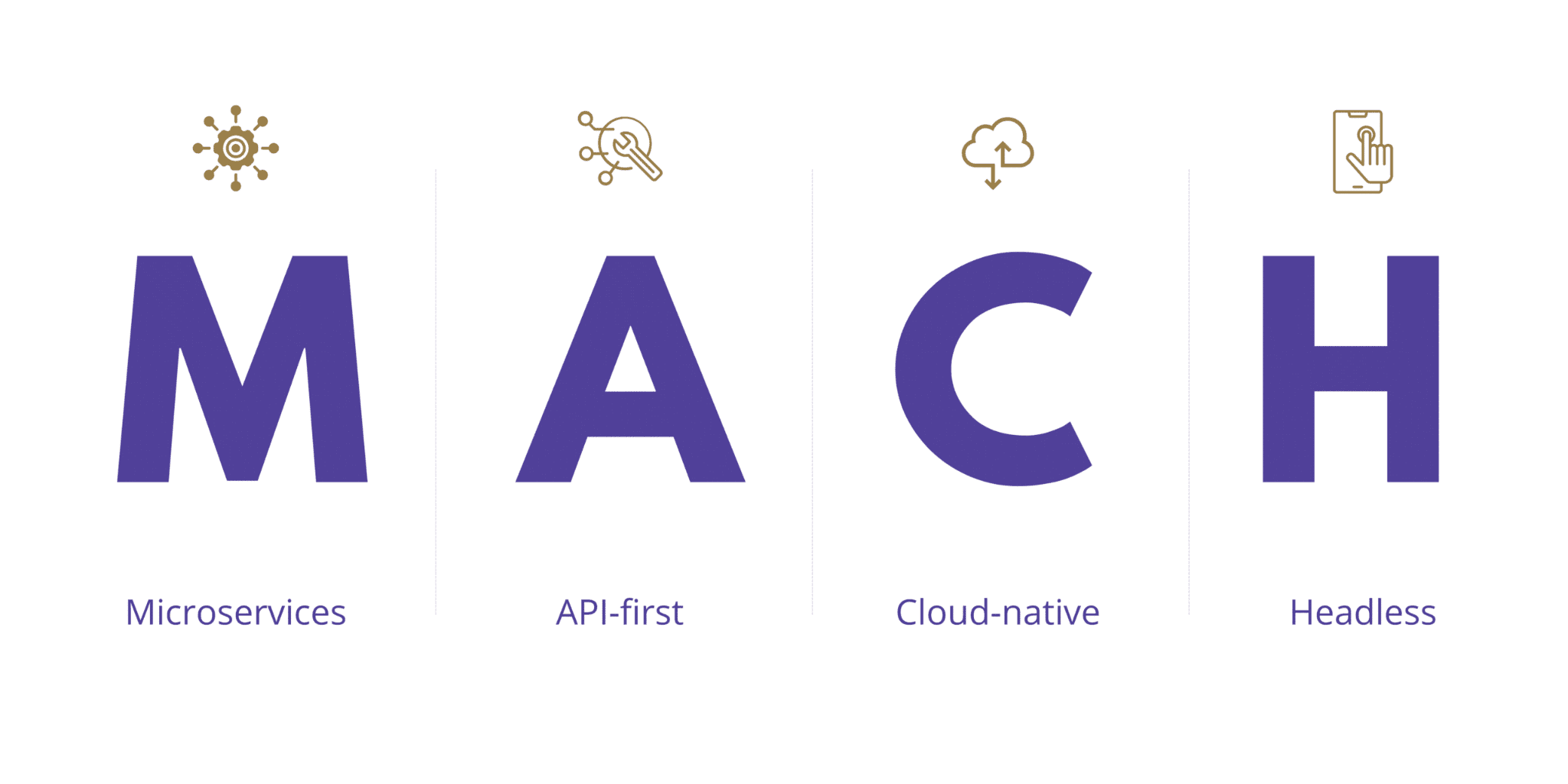
The industry has a name for this approach: MACH. Don't worry about the acronym, it just stands for its core ideas: microservices (M), API-first (A), cloud-native (C), and headless (H). The API is just the standard cable that lets everything talk to each other.
Core Platform Components and Tools
It might feel like you're just snapping together someone else's LEGOs, but what the vendor is really doing is giving your team the raw components to build something unique.
Your interface engineers take these pre-built modules, which are usually designed for mobile screens first, and use them to put together a visual experience that fits your brand. Once it's assembled, a smart layer in the middle makes sure all the separate pieces talk to each other correctly, so your customer only ever sees one fast, seamless website. Your audience then accesses your high-performing, cross-device, handheld-optimized portal.
This middle layer is the secret to the speed. This avoids the client browser having to transmit numerous data calls to multiple servers. It stops the user's browser from having to make a dozen slow, separate trips to get data from all your different systems.
For example, a platform like Alokai can catch a single request from a user, then go out and talk to your CMS like Contentful and your sales tool like HubSpot on its own. It gathers all the info, organizes it, and sends it back to the user in one optimized package.
Managed Infrastructure and Maintenance
The vendor also takes on the entire headache of infrastructure and maintenance. I’ve seen good teams lose whole sprints to routine server patching and security updates (the kind of soul-crushing work that makes your best people want to quit). Because the FEaaS provider handles the cloud hosting, they're the ones on the hook for keeping the site online, making sure it can handle traffic spikes, and protecting the data.
This is the real operational win. Your team's scope for maintenance shrinks down to only the custom code they actually wrote. Digital defense obligations are vastly reduced as you don't manage the underlying servers. It also means your security responsibilities get a lot smaller.
Stop managing servers and just focus on the code.
Choosing and Implementing a FEaaS Platform
This is where you can make a mistake that will haunt you for years. Picking a FEaaS platform isn't like buying a tool. It's more like getting married.
You're choosing a long-term partner, and a bad choice means you’re not just stuck, you’re trading your old headaches for a brand new, more expensive set of them. So you have to get this right.

Key Criteria for Platform Evaluation
You can't just watch the sales demos. Every vendor will promise you the world, and their feature lists all start to look the same after a while. The real differences are buried in the details.
Here's how to dig them up. Make a simple scorecard for your top choices. For every vendor, rate them on a scale from 1 (terrible for you) to 5 (a perfect fit) on the stuff that actually matters: how their pricing scales, what integrations they support, where their customization limits are, and how good their support and docs really are when your team is stuck at 2 a.m.
But the most important thing to check is the tech itself. You have to pop the hood and see what the engine is made of. The big question: Is it built on something your team knows or can easily hire for?
It is critical to find out if it’s running on a major library like React (and its framework Next.js), or if it’s in the Vue world (with Nuxt.js). The nightmare scenario is that it's a proprietary black box that only their engineers understand. If that's the case, you're completely at their mercy.
The Typical FEaaS Implementation Process
When it's time to actually build, the part that will trip you up is almost always the data. The sales pitch makes it look like you just plug your backend systems into the new front end, and everything magically works. I used to fall for that, too.
The reality is a lot of tedious work trying to get all your different data sources to speak the same language. Overcoming this data friction requires writing custom translation routines inside the coordination tier.
For example, your product database might organize features one way, while your main e-commerce system does it completely differently. Someone has to write the code that sits in the middle and translates between them. It’s not glamorous work, but it’s real engineering. And it’s the number one thing I see teams forget to budget time and money for.
Leading FEaaS Platforms to Consider
Start by realizing that there's no single "best" FEaaS platform. The market is split into two big camps. Some platforms are toolkits for your engineers to build faster.
Others are visual editors for your business teams so they can get things done without writing code. Pick the tool that fits the people who will actually be using it day-to-day.
Platforms Focused on Headless E-commerce
This field is very, very crowded. One that stands out is Vue Storefront, mostly because it's a major open-source option. For your developers, that means they have total freedom to get under the hood and change the code.
They aren't locked into decisions someone else made.
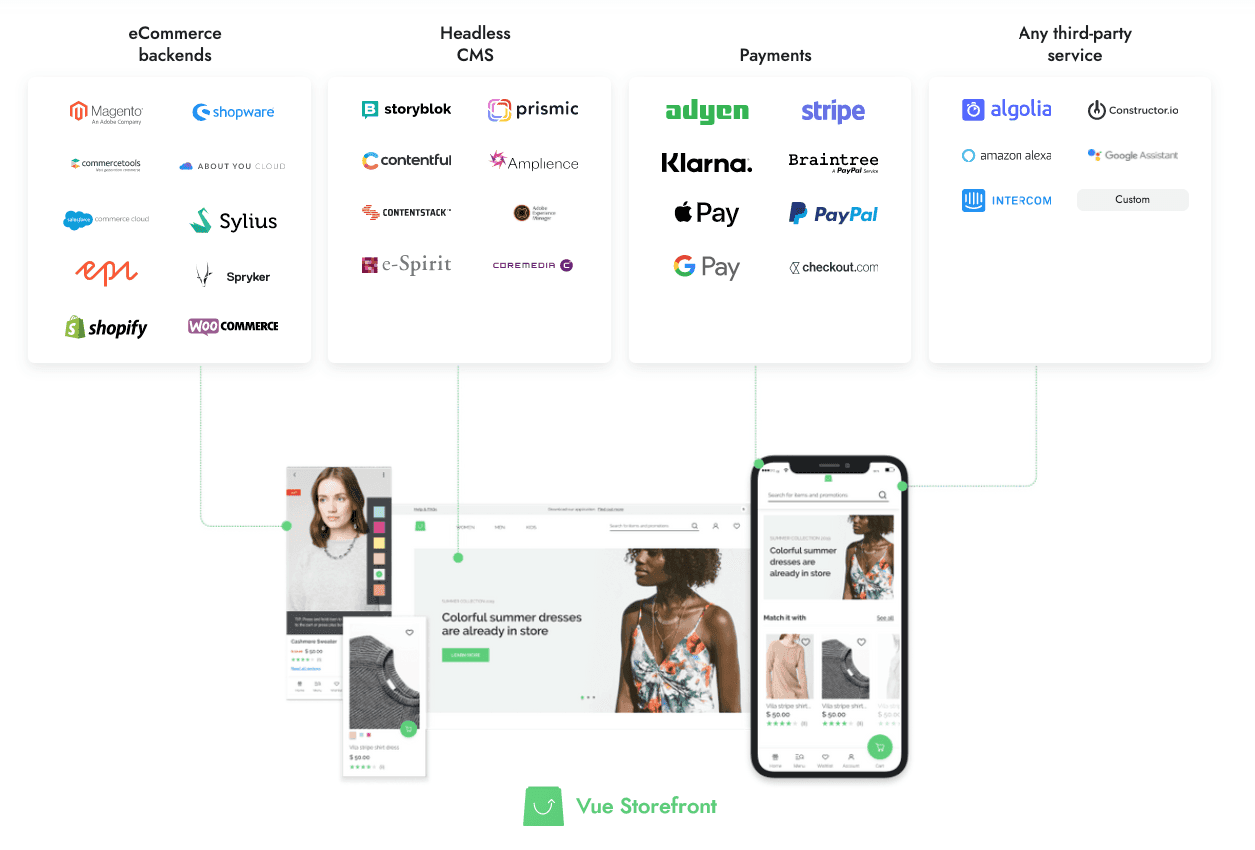
The platform itself is built on Vue and the Nuxt.js framework. It has a data layer that connects to different backends, with ready-to-go connectors for e-commerce systems like Shopify, BigCommerce, and Commercetools. It also connects to decoupled content managers and other external services. It also comes with more than 50 pre-built layout parts (which saves a ton of grunt work), pulling everything together in one place.
Platforms for General Web Applications
The market is much bigger than just storefronts. You'll find tools that are a big fish in a small pond, completely owning a specific niche. For example, platforms like Retool and Appsmith are built specifically for creating internal business software, serving both technical and non-technical people on your team.
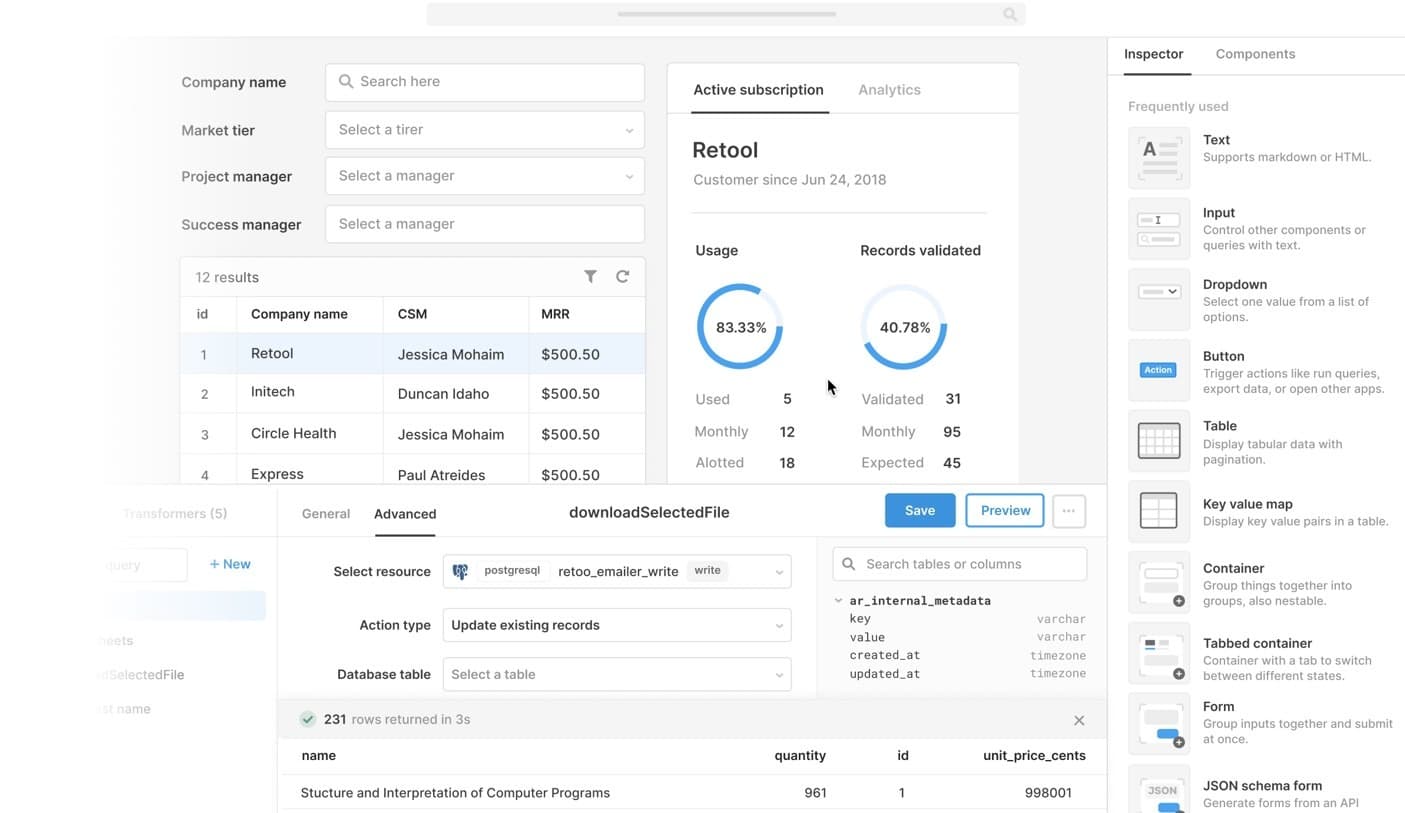
Other platforms focus on different parts of the stack, such as storefronts like Shogun, Vue Storefront, and Alokai. Infrastructure providers like Vercel and Netlify focus on presentation delivery, hosting, and cloud networks for developers.
So if your team already knows Vue and you need an open-source system that can talk to multiple backends for an e-commerce project, Vue Storefront is probably where you should start looking.
But if your goal is to build internal admin panels or dashboards, you should be looking at tools like Retool or Appsmith. It all comes down to the job you need to do.
The Future of Front End as a Service
The future of these platforms depends on two key factors: standardization and AI integration.
Greater Standardization and AI Integration
The framework is in an early stage of adoption and will change. As adoption grows, the industry will define standards by absorbing best practices from the engineering world.
AI and machine learning are becoming basic elements of software architecture. To implement AI on the front end, a display layer is needed to handle smart, automated interactions. This makes FEaaS an attractive choice for companies wanting to build these systems efficiently.
Expansion into New Industries
This model will expand beyond its e-commerce origins. The need to launch products faster while reducing time and cost on code is universal across businesses.
Interest has grown swiftly among lean organizations. As adoption by these companies increases, pre-packaged layouts will appear in new areas, such as internal tools for finance or logistics.
Frequently Asked Questions
People ask a lot of questions about this model, but they often get stuck on the wrong things. They see it as just another tool to buy, but that misses the point. The real choice is about how your team spends its time. Engineers can either build plumbing, or they can build the business.
What's the difference between 'front-end service' and 'front-end-as-a-service'?
It’s the difference between hiring someone and subscribing to a product. A "front-end service" is just what it sounds like: you pay people to do the professional work of programming a user interface for you. In contrast, "front-end-as-a-service" (FEaaS) is a model where you subscribe to get access to pre-built UI components.
Think about Software-as-a-Service (SaaS), which delivers finished products like an email platform or a CRM database. FEaaS is a bit different. It’s more like an engineering kit for your own developers to use, so they can assemble your software much faster.
Which types of businesses benefit most from FEaaS?
The short answer is any team that needs to ship a digital product on a tight schedule. It’s a huge help for early-stage ventures and small-to-medium enterprises (SMEs), giving them an affordable and flexible way to build that can change as their business strategy does. It yields an economical, elastic framework that adjusts to fluid commercial strategies.
It’s also a lifesaver for marketing departments that don't have a big engineering team on standby. Even huge companies with ancient systems can use it to put a modern face on their products without having to rebuild everything from the ground up.
How does FEaaS connect to our existing backend systems?
So how do you even do that? These platforms are designed to connect to your server-side applications using standard tools like webhooks and API pathways. This is how the front end your users see can talk to your database and exchange information.
To make it easy, providers give you software development kits (SDKs) so your engineers can link the visual components to your data using either GraphQL queries or REST API systems. A dedicated data coordination layer aggregates and formats diverse data streams.
How much customization is actually possible with FEaaS?
A lot is possible, but not everything. For the visual side of things, most providers give you a ton of freedom. Changing all your branding, colors, and fonts is almost certainly possible using standard CSS and the platform's built-in design tools.
The limit arrives when you try to create a totally unique UI element with some special behavior that isn't part of the platform's library. Giving up that last bit of code-level control is the core trade-off you make. In exchange, you get to launch fast and have all your infrastructure hosted for you.
How does adopting FEaaS affect my current dev team?
It shifts your team’s focus from building the basic UI plumbing to simply using it. This is a good thing. It frees them up to work on the proprietary business logic that actually grows your company. They'll spend a lot less time on maintenance and a lot more time on innovation.
The decision to use Front End as a Service is a business one. A team can be tasked with building and maintaining a user interface, a job that's hard but doesn't make you any different from your competitors. Or, that work can be handed to a service, which means living with the constraints and freeing the team to build the features that actually win customers.
The trade is a degree of control for a huge gain in focus. That's the entire deal.
Share this page


Table of Content

Subscribe to Golden Owl blog
Stay up to date! Get all the latest posts delivered straight to your inbox