Is HTML hard to learn? The Honest Truth
& Realistic Timeline for Beginners.
Artificial Intelligence
Is HTML hard to learn? The Honest Truth
& Realistic Timeline for Beginners.
Dec 13, 2023
about 7 min read
HTML is not hard to learn? No, it’s the most beginner friendly web language. Discover why you can grasp the basics in 2 days and master the structure in 1 month with our realistic guide.
In the ever-evolving realm of technology, web development is a cornerstone of the digital landscape. Websites serve as virtual storefronts, information hubs, and communication channels for businesses, organizations, and individuals. At the heart of web development lies HTML—the language that defines the structure and content of web pages.
Often perceived as a daunting task by non- techies, learn HTML is the first stepping stone toward career in tech. However, a common question arises: is HTML hard to learn? Like many things in life, the answer is rather complex. But the short answer is: No, it is simpler than you think. In fact, it is widely considered the easiest programming language for beginners to start their journey.
Why is HTML Important?
HTML is important in web development because it provides the structure for websites and web applications. Without it, there would be no way to create the complex layouts we see on modern websites. In addition, HTML is versatile, allowing you to create anything from simple websites to complex web applications.
HTML is not only important for web developers but also for anyone who works with or uses the web. Knowing HTML can help you:
Build your own website and customize existing templates.
Fix errors and improve your company’s website and newsletter without relying on the IT team.
Understand how to make your website more accessible for people with disabilities using semantic HTML tags.
Collaborate more effectively with technical teams by having a common language and understanding of web development.
Enhance your designs with HTML elements and attributes.
Learn other web development skills, such as CSS, JavaScript, or PHP, as HTML is often a prerequisite for these languages.
Open up more income-generating opportunities, as HTML is a valuable skill in the job market.
In short, HTML is the foundation of the web. Therefore, learning it helps you create, communicate, and collaborate more effectively on the web.
HTML & Programming Language: Why it’s easier?
Before knowing if HTML is hard to learn, it is crucial to clarify its nature. HTML—or HyperText Markup Language—is not a traditional programming language in the strictest sense. Instead, it is a markup language specifically designed to define the structure and content of web pages. It utilizes a series of tags and attributes to indicate headings, paragraphs, images, links, and other elements that form the building blocks of a website.
Programming languages (like Python or Java) require logic, math, and complex algorithms. HTML simply uses "tags" to tell a browser what to display. To fully grasp this technical distinction and how these languages work together, you should understand the core difference between HTML, CSS, and JavaScript.
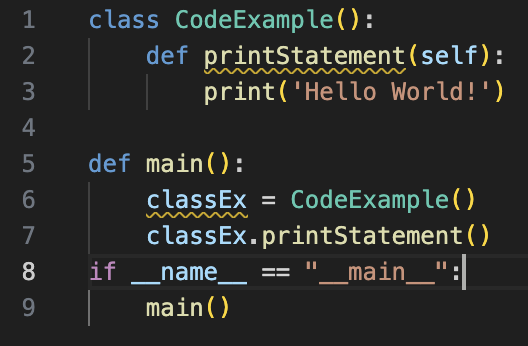
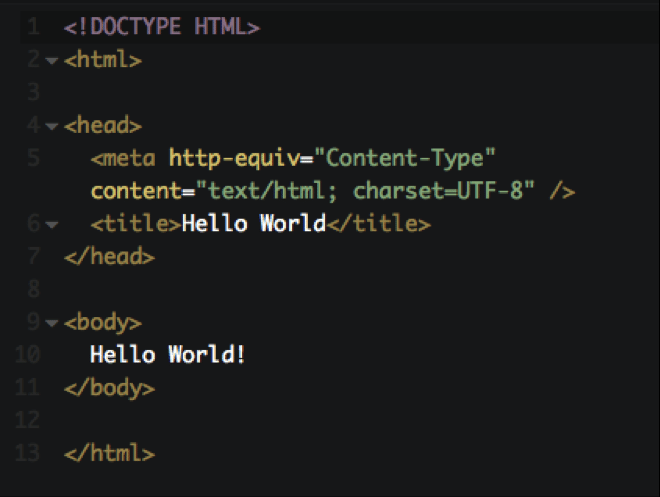
For example: Let’s look at the difference with the classic “Hello World” test:
1.Python (Programming Logic) You are giving a command. It requires logic, strict syntax rules, and a specific environment setup to run.
2.HTML (Visual Structure) you are simply labeling a box. It is just English words wrapped in tags. It runs instantly in any web browser.
Because of this, HTML is not harder but easier than programming languages like Python and JavaScript. The syntax is relatively straightforward, using English-like tags and attributes, making it easier to grasp the fundamentals.
How long Does It Really Take to Learn HTML?
One of the biggest frustrations for beginners is the lack of a clear timeline. While everyone learns at a different pace, here is a realistic roadmap for the average learner:
Stage 1: The Weekend Warrior (1-2 Days)
Goal: Understand the syntax and basic tags.
What to learn: How to open a text editor, write a basic HTML structure (<html>, <head>, <body>), and use core tags like <h1> (headings), <p> (paragraphs), and <img> (images).
Outcome: You can build a very ugly, but functional, text-based webpage.
Stage 2: The Builder (1 Week)
Goal: Creating structure and connecting pages.
What you learn: Lists (<ul>, <li>), Hyperlinks (<a>), creating forms for user input, and basic tables.
Outcome: You can create a multi-page website that links together.
Stage 3: The Pro (1 Month+)
Goal: Semantic HTML and Accessibility.
What you learn: This is where it gets "harder." You learn not just how to use a tag, but which tag is right for SEO and screen readers. You will learn about <header>, <nav>, <article>, and how to connect your HTML to CSS.
Outcome: You are ready to build professional-grade website structures.
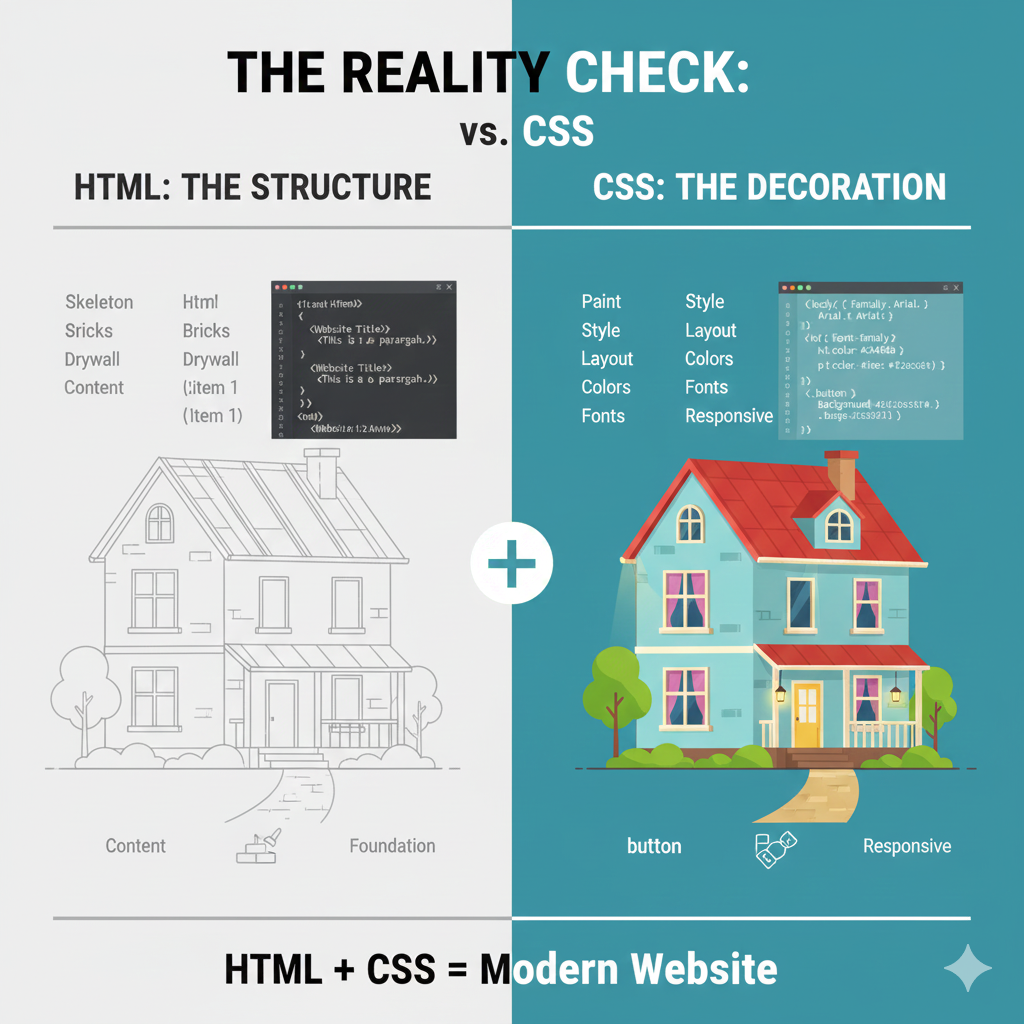
The Reality Check: HTML vs. CSS
If HTML is so easy, why is web development considered difficult?
The Catch: HTML is useless without CSS (Cascading Style Sheets).
Think of a house:
HTML is the skeleton, the bricks, and the drywall. It holds the house up.
CSS is the paint, the carpet, the lighting, and the decoration.
Learning HTML alone will result in a website that looks like a document from 1995. To make a modern website, you must learn HTML and CSS together. While HTML takes a few days to grasp, CSS requires a creative eye and adherence to UI design golden rules, which is where the real challenge lies.
Is HTML Hard to Learn?
Whether HTML is hard to learn depends on several factors, including prior experience, learning style, and dedication. If you do not have a programming background, the main reason why HTML is difficult is because it presents new concepts and terminology.
Fortunately, numerous resources, including online tutorials, interactive courses, and books, make learning HTML manageable.
The learning curve is relatively gentle, allowing beginners to grasp the basics quickly. With consistent practice and exposure to real-world examples, mastering HTML becomes achievable.
3 Reasons Beginners Think HTML is hard (And Why They are Wrong)
Whether HTML is hard to learn depends on several factors, including prior experience, learning styles, and dedication, Here is what influences your learning curve:
1. The "Scary" Code Appearance
The visual complexity of code—full of angular brackets (<, >) and unfamiliar indentations—can be intimidating. This is often the first hurdle for non-tech individuals. However, HTML is actually very logical, using simple English commands wrapped in tags. Unlike programming languages that require abstract thinking for algorithms, HTML is essentially a list of simple instructions (e.g., "start paragraph," "insert image").
2. Memorizing Tags
Beginners often feel overwhelmed by the sheer number of HTML tags. The perceived necessity to memorize every tag from <a> to <footer> is a myth. You don't need to memorize every tag; focus on the core 20% of tags that handle 80% of web structure (like <h1>, <p>, <div>, <img>). Treat official documentation (like MDN Web Docs) as your dictionary—a resource to look up specialized tags when you need them.
3. Connecting with CSS/JS
Frustration often comes from styling (CSS) or logic (JavaScript) issues, not HTML itself. When a developer spends hours trying to center a <div> (a CSS problem) or fix a button that doesn't click (a JS problem), they mistakenly label the entire process as “hard HTML.”. Master the HTML foundation first, and understand that the real challenge lies in integrating the three languages seamlessly.
What Actually Makes HTML Tricky
Once you pass the initial stage, the true complexity of HTML emerges. This is not about syntax; it's about making choices that align with web standards:
Semantic HTML
Don't just learn how to display content; learn how to structure it meaningfully. This is about Semantic HTML—using specific tags like <article>, <nav>, and <section> instead of the generic <div> for everything. Using non-semantic code (e.g., using a <div> styled as a button instead of a <button> tag) is a common pitfall.
Accessibility and SEO
Semantic practice is crucial for Accessibility (making sites usable for people with disabilities who use screen readers) and SEO (Search Engine Optimization). Google and screen readers depend on proper semantic structure (e.g., using <h1> only once, placing navigation inside <nav>) to correctly understand and rank your content.
How to Learn HTML effectively (Step-by-step)
Here are some tips that can help you learn HTML more quickly and effectively:
Step 1: Start with the Basics
HTML is a vast and evolving language that has many features and functionalities. However, you do not need to learn everything at once. Start with the basic and essential concepts and elements of HTML, such as the syntax, document structure, common tags, and attributes. More importantly, focus on understanding the DOM Tree (Document Object Model)- how elements are nested -ratehr than just memorizing individual tags...
Step 2: Practice Regularly and Build Project
The best way to learn HTML is to practice it. Writing and editing HTML code can help you reinforce your knowledge, improve your skills, and discover new possibilities.
You can practice HTML by creating your own web pages and projects—don’t just read, build something tangible like a simple "Portfolio" or "Personal Blog" immediately. You can use online platforms and tools like CodePen, JSFiddle, and W3Schools to write and run HTML code in your browser.
Step 3: Inspect Element: The Developer’s Secret Weapon
A powerful technique is using "Right-click -> Inspect" on your favorite websites. This allows you to see how professionals structure their code, offering real-world examples of efficient and semantic HTML that you can learn from.
Step 4:Learn from and collaborate with Others
Learning HTML can be more fun and rewarding if you learn from others. You can join online communities and forums to ask questions, share your work, get feedback, and learn from other HTML enthusiasts and experts.
Some examples of online communities and forums for HTML learners are Stack Overflow, Reddit, and Quora. You can also follow blogs, podcasts, YouTube channels, and social media accounts that provide valuable and fascinating information and tips on HTML and web development.
Step 5: Keep up with the Trends and Tools
HTML is a dynamic and evolving language that constantly introduces new features and standards. Therefore, keeping up with the latest trends and developments in HTML and web development is crucial.
You can do this by reading current about software development trends will ensure you aren't learning obsolete tags. Eventually, you may even want to explore what a web framework is to speed up your coding process significantly.
FAQs: Quick Answer For Beginners
Q: Do I need to be good at math to learn HTML?
A: Absolutely not. If you can count to 10, you are good to go
Q: Can I get a job knowing only HTML?
A: No. HTML is the foundation, but employers require HTML, CSS, and usually basic JavaScript. HTML is the entry ticket, not the whole package.
Q: Is HTML dying?
A: No. Every website you visit, from Facebook to Google, is built on HTML. As long as the internet exist, HTML will be essential.
Conclusion
HTML is not hard to learn, although it requires time, effort, and persistence. It is a straightforward and intuitive language that defines the structure and content of a web page. HTML is widely used, has extensive documentation, and is supported by many tools and platforms.
The difficulty of learning HTML depends on several factors, including your prior knowledge, learning style, motivation, and resources. However, following the aforementioned tips can make your HTML learning experience more manageable and effective. Discovering HTML can be a rewarding and enjoyable process that can unlock many opportunities and possibilities for you in the world of web development.
Share this page
Table of Content
Subscribe to Golden Owl blog
Stay up to date! Get all the latest posts delivered straight to your inbox