
How to use AI in real estate: automate lead follow-up, speed up valuations and marketing, and keep every step compliant with Fair Housing rules.


AI Agents Examples in Real Life for Software Teams
Oct 14, 2026
about 7 min read

AI agents examples in real life: how a coding agent fixes a failing test and a release agent decides what ships, plus the limits that keep them safe.
AI agents examples in real life are most useful when they show a system working through an unclear problem, then acting within limits someone set in advance. The two below come from software teams. One agent fixes a failing test. The other decides whether a release is ready to ship.
Both have to gather evidence before they act, and both stop before a risky change reaches production. That approval step is what makes them agents and not scripts that happen to call a model. It also points to the rule behind this article: pick the smallest setup that does the job.
Software engineering agents
AI agents examples in real life include a coding agent that keeps investigating when its first search misses the fix. Here is how that workflow is laid out.
TRIGGER
The workflow starts when a test fails or a user reports a bug.
GOAL
The aim is the smallest safe fix, checked before anyone calls it done.
CONTEXT
Give the agent this context before it starts investigating:
- Repository
- Issue description
- Test output
- Project instructions
- Recent relevant changes
TOOLS
The agent works with a bounded set of tools:
- Repository search
- File read / edit
- Terminal
- Test runner
- Lint / typecheck
AGENT DECISIONS
What it does next depends on what it finds in the repository and what the tests say:
- Which files to inspect
- What hypothesis to test
- Whether a code change is needed
- Which tests should run first
- Whether broader regression testing is necessary
VALIDATION
The patch isn’t finished until the required checks pass:
- Targeted tests pass
- Lint / typecheck pass when relevant
- Intended behavior is fixed
- Unrelated files were not changed accidentally
Run it in a sandbox, behind a review step someone has to approve. Then a bad guess costs you a rejected patch, not a broken release.
HUMAN CHECKPOINT
A person must approve any production deploy, risky migration, use of secrets, or big infrastructure change.

RESULT
What comes back is a patch that has passed its checks, plus a short note: what broke, what changed, which tests ran.
What makes this agentic is that it adapts to what it finds. A fixed script can’t know which file holds the root cause before it runs. The agent can go and look. For complex work, have it write a plan and the hypothesis it wants to test before it touches any code.
The second example is bigger. Here one agent runs several others to decide if a release can ship.
MANAGER AGENT
The Manager Agent owns one question: is this release ready to launch?
SPECIALISTS
It calls in specialists when it needs evidence: Code Review, Test, Security Review, Documentation, and Release Notes agents.
MANAGER DECISIONS
Every launch-readiness call belongs to the Manager Agent:
- Which specialist to invoke
- What evidence is still missing
- Whether findings conflict
- Whether a blocker is resolved
VALIDATION
The readiness review checks that:
- Required tests pass
- Security blockers are cleared
- Docs are updated
- The release artifact matches the approved commit
- Unresolved risks are recorded
HUMAN CHECKPOINT
A person approves the final production release.
RESULT
Out comes a readiness report with evidence attached and a plain answer, go or blocked.
When to use an AI agent instead of automation
Adding an AI step to a fixed automation doesn’t make it an agent. You need one when what turns up halfway through changes what you do next. In practice that means: intermediate results change later decisions, the number of steps is not known in advance, the model must choose among several tools or actions, the environment provides feedback, and success can be verified.
Compare a support flow built as fixed automation:
NEW TICKET ↓
SUMMARIZE WITH AI ↓
ALWAYS CREATE CRM NOTE ↓
ALWAYS SEND TEMPLATE B
Every ticket goes through the same steps in the same order, whatever it says.
Now hand the same ticket to an agent. If a customer asks for a refund, it checks the account only if it needs to, and the refund policy only if one applies. Then it resolves the ticket, takes an allowed action, waits for approval, or escalates.
VERIFY CURRENT STATE ↓
RESPOND
Hit something unexpected and a fixed script just stops. An agent can try a different tool call when new evidence opens another way through.
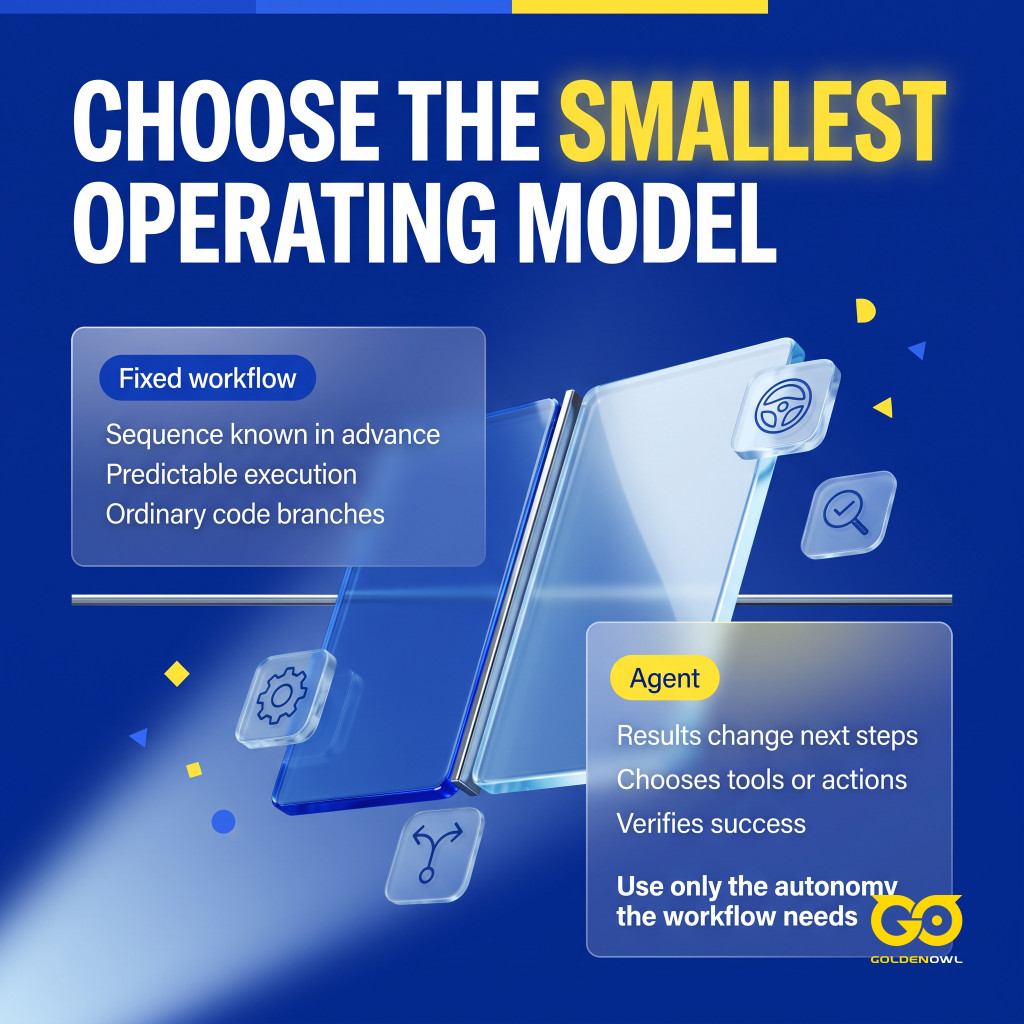
That flexibility is only worth having when the workflow needs it. Often it doesn’t, and two simpler options cover a lot of ground.
A simple model call is enough when: one response can solve the task, all required context is already available, no external action is required, and success does not depend on iterative environmental feedback.
A deterministic workflow is the better choice when: the sequence is known in advance, every input follows the same path, compliance requires predictable execution, or branching works more reliably in ordinary code.
So use an agent only when interim results really do change later decisions. If they don’t, one of the two simpler options above will do the job.
> The goal is not maximum autonomy. The goal is the minimum autonomy needed to solve the workflow well.
Core agent architecture
In both workflows above, architecture means the limits that keep the agent useful. Perception pulls signals from the repo, CI, tickets, and deploys into context. Reasoning applies the workflow’s rules. Execution calls only approved tools. Validation checks the change or the release evidence, and approval checkpoints leave big actions to the right person.
Take the reasoning layer. Here the model works from your repo, your project rules, and what changed recently, not just from what bugs usually look like. The model checks intent, policy, and risk before it acts.
Execution is where it touches real systems: systems of record (SOR), APIs, databases, ERP or CRM tools, bots, maybe an old app nobody wants to rewrite.
Here’s the rule I’d hold to. The model says what should happen, as structured intent. It doesn’t make the change. Plain backend APIs do the writes and outside calls inside fixed limits, so that part stays testable and you can audit it.
Agentic process automation (APA) calls this the brain-and-hands model. The agent thinks. Orchestration runs the workflows, approvals, and calls between systems. Automation does the fixed actions.
If you want a concrete shape, use a state machine driven by async events. A context manager holds what the agent knows so far. A tool dispatcher runs the actions you’ve allowed, and a decision engine picks what to do next.
Human approval checkpoints
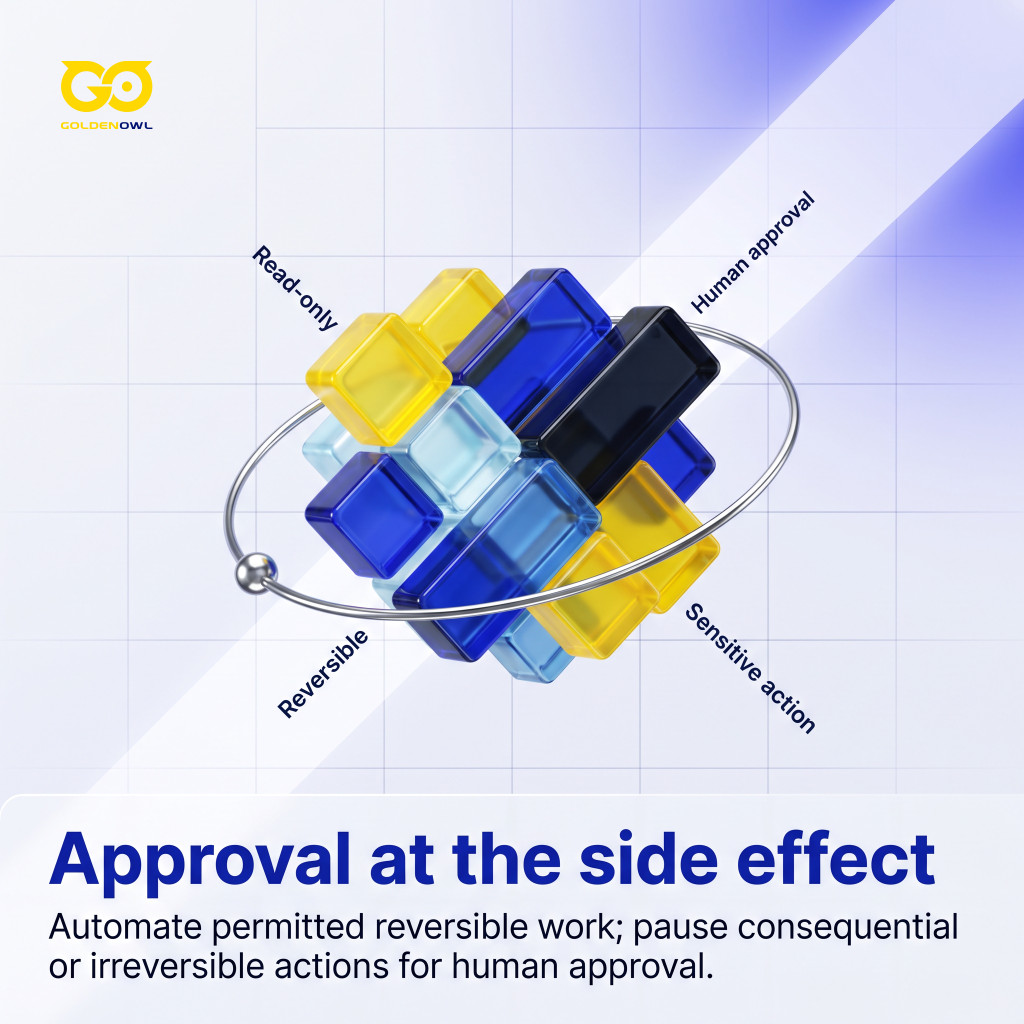
Any tool call with a sensitive side effect needs an approval pause. OpenAI’s current docs on guardrails and human review also suggest automated checks on inputs, outputs, and tool behavior.
Read-only actions that can be undone can run on their own. Deleting data, spending money, or messaging anyone outside the company can’t, so the agent stops and waits for a person.
Roll it out in order: read-only tools first, then payments, deletion, production deploys, and outside messages, one at a time. Wrap the approval around the one risky step. A person signs off on the refund, not on every lookup before it.
Skip this and an agent acting alone can make things up, act without permission, open security gaps, or break compliance rules. Enterprise agent platforms add audit trails, approval flows, role-based access, and human-in-the-loop checks for exactly that reason.
Outside software teams, the same idea looks like this in finance and in customer support:
HUMAN CHECKPOINT
Someone in finance signs off on payment release, final journal posting, and any exception.
HUMAN CHECKPOINT
A support lead reviews high-value refunds, policy exceptions, and any case where it’s unclear who owns the account.
Workflow evaluation metrics
Judge an agent on four things: outcomes, decisions, reliability, and cost. Don’t judge it on how good the reply sounds. Smooth prose can hide a failed API call.
Outcome Metrics
For every run, check whether the agent actually finished the task it was given:
- Task success rate
- Resolution rate
- Correct completion rate
- Human escalation rate
- Time to successful completion.
Decision Metrics
These show whether its choices fit the task as it unfolded:
- Correct tool selection
- Correct tool arguments
- Appropriate handoff
- Appropriate stop behavior
- Approval compliance.
Reliability Metrics
These expose breakdowns such as repeated or unsupported actions:
- Unnecessary retry rate
- Duplicate action rate
- Unsupported assumption rate
- Validation failure rate
- Recovery success rate.
Efficiency Metrics
These count what each successful task costs in resources:

- Latency
- Tool calls per successful task
- Token usage
- Cost per successful task
- Human review cost.
Metrics on the final answer only tell part of the story. OpenAI’s current agent eval guidance says to look at traces. A trace records the model calls, tool calls, guardrails, and handoffs across a whole run.
You can also use an LLM as a judge. It scores facts, citations, completeness, source quality, and tool use from 0.0-1.0, then gives a pass or fail. Keep people in the loop anyway, because they catch edge cases automated tests miss.
Confidence scoring adds one more check. It turns the model’s raw output scores (logits) into probabilities, and anything below a set threshold goes to a person for review.
Frequently asked questions
What makes an AI agent different from a chatbot?
A chatbot answers your message and waits. An agent is handed a goal and keeps going. It picks a tool, looks at the result, updates what it knows, and then decides: carry on, ask, escalate, or stop for review.
Fixed automation is “if this, then that.” It’s great until the case it wasn’t written for shows up. An agent reads the context and makes a call, so edge cases don’t simply fall through.
Is ChatGPT an AI agent?
Not on its own. ChatGPT is built mainly as a conversational system. Connected to tools and workflows, it can behave in agentic ways. As a standalone chatbot, though, it isn’t a fully autonomous enterprise agent, since by default it doesn’t execute governed backend transactions on its own.
When should an AI agent ask for human approval?
It should ask when it lacks permission, and stop when it can’t safely guess key facts. You can also set approval pauses for repeated failures, actions outside its scope, and sensitive tasks.
Can I run multiple AI agents together?
Yes, if the job splits cleanly between specialists. A procurement agent can pair with finance, and an IT agent with security. After a meeting, one agent writes the summary, another sends follow-ups, and a third updates the CRM.
Do AI agents always need memory?
No, most only need the current task state or a short session. Long-term memory earns its place when facts must carry across sessions. If you don’t need it, it mostly adds privacy and relevance problems.
In one-off transactions, long-term memory can do harm. Old session history can leak into the context and bring policy or privacy risks with it.
Conclusion
Use these AI agents examples in real life to draw a clear boundary around your own agent. Give it one bounded workflow, only the tools it’s allowed to use, and a set point where a person approves. Keep task state for as long as the job needs and no longer. Add a second agent only when the handoff earns its keep. Chat is fine for talking, but changes to real systems need a workflow that knows when to stop.
Share this page


Table of Content

Subscribe to Golden Owl blog
Stay up to date! Get all the latest posts delivered straight to your inbox