
How to use AI in real estate: automate lead follow-up, speed up valuations and marketing, and keep every step compliant with Fair Housing rules.


How to Create an AI Agent
Oct 14, 2026
about 12 min read

How to create an AI agent: define the workflow, pick the model and tools, test it, and add human approval and cost limits before launch.
How to create an AI agent starts earlier than most teams think, with a choice about which work deserves one. Picture a support team. The messy tickets, where customers describe the same fault in endlessly different words, could go to an agent, while password resets stay with the plain script that already handles them fine. This guide follows that choice through six steps to a supervised launch.
What an AI agent is made of
Before getting into how to create an AI agent step by step, it helps to know what one is made of. Underneath the branding, an AI agent is a language model plus the parts around it that decide what it can see, what it may do, and when it has to stop. Most builds share the same handful of them. I’ll use one example throughout, an agent that answers support tickets for a software company.
The model does the language and reasoning work. A ticket comes in: a customer can’t log in. The model reads it, along with whatever context you supply, and has to decide whether that’s a forgotten password or something bigger.
Instructions are the agent’s job description. For our support agent, they would say it answers product questions for paying customers and that a good answer ends with a fix the customer can try. They would also forbid promising a refund, because the agent has no power to give one. The part teams forget is the exit, the point where the agent stops and hands the ticket to a person. Without one it just keeps going. Nothing in it knows when to quit.
With tools, the agent can do something about a ticket. It can look the customer up in the customer relationship management (CRM) system, say, and book a call with an engineer on the calendar.
Then there is the information each task depends on, such as product details and the customer’s earlier messages. Pasting the whole help center into a login question mostly gives the model more places to get lost.
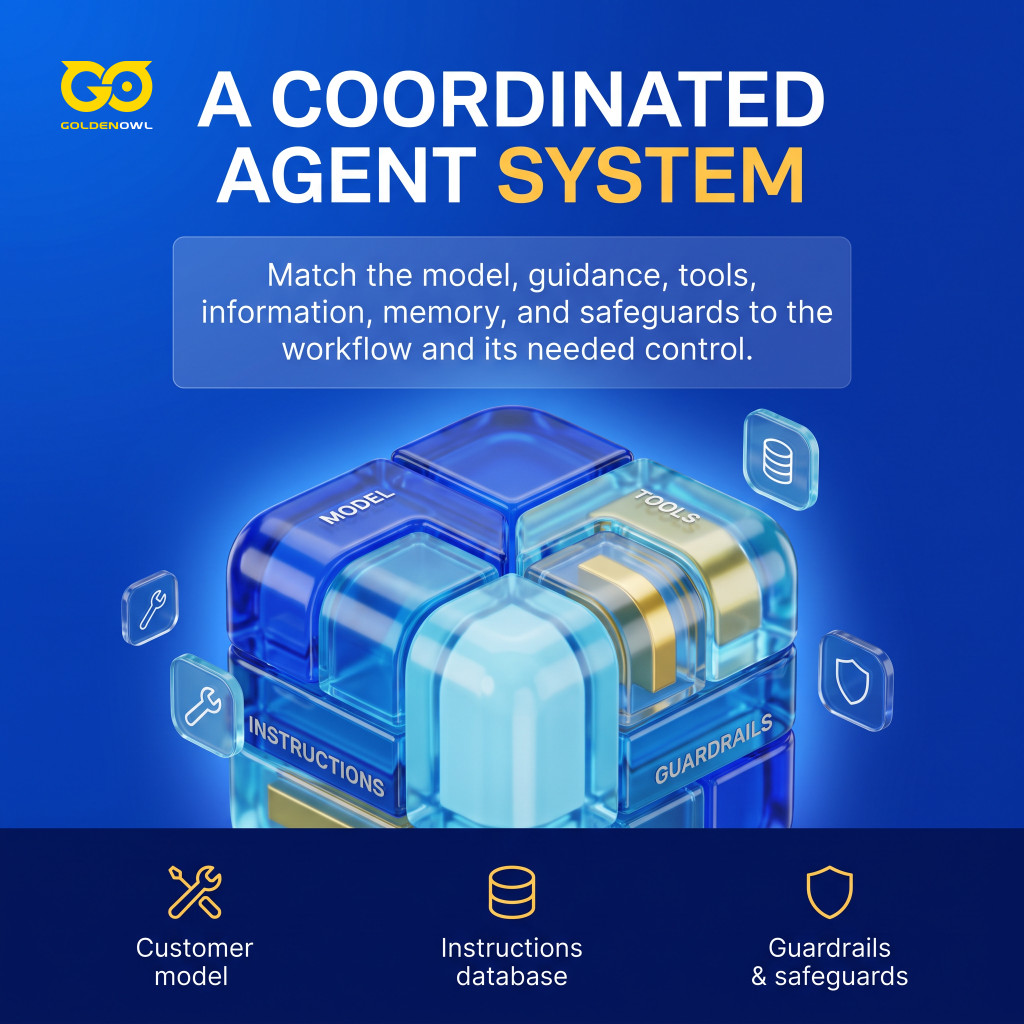
Memory lets the agent carry details forward, such as the customer who asked to be contacted by email only. Agree early on what it stores and who gets to see it, because anything the agent remembers is customer data you’ll have to answer for.
Guardrails stop the agent from doing unsafe or unauthorized things mid-run. Evaluations tell you, before launch and after, whether it does the job at all.
Put together, a basic agent runs a simple loop:
- Take in the goal and current context.
- Decide the next useful action.
- Produce an answer or call an approved tool.
- Review the result.
- Stop, ask for help, or continue.
That loop needs a ceiling. Cap the steps and the run time, and set a hard spending limit. A confused agent will happily keep trying variations, and you pay for every one. The SWE-agent research suggests a cap rarely gets in the way of success: 93.0% of resolved instances were submitted before exhausting a $4 cost cap, compared with 69.0% of instances overall. In other words, the runs that succeeded rarely needed the extra budget.
Step 1: Define the task
Start by choosing one job, the kind with an obvious trigger and an obvious finish line. A useful test is whether you could walk a sharp intern through it. If even that intern couldn’t do it with enough time and resources, the job is too big, or not realistic yet.
Next, gather 5-10 real examples of the task. For the support agent, that means last month’s real tickets: some easy ones, and some strange ones too. If every example turns out to be a one-line lookup, the job is too trivial; if every one becomes a sprawling investigation, it’s too vague. Don’t throw them away. Later they become the yardstick you judge the agent against.
After that, find whoever does the task today and get them to talk you through it while you write a standard operating procedure (SOP). On paper you can see where your colleague stops to make a judgment call, or opens another tool. Write it the way you would brief a new hire on their first morning: what kicks the task off, how they get from there to the output, and exactly where the job ends.
It is also quite possible that the task doesn’t need an agent at all. Whenever the same rule handles a case correctly every time, ordinary automation will usually be cheaper and more dependable. Microsoft found as much in one Azure Networking system, where fixed workflows grew to about 45% of executions over eight months, cutting per-incident agent cost by more than 70% as incident volume roughly doubled.

An agent earns its place on messy material that needs judgment, like the support inbox above, or a billing question that only makes sense once several records are compared. There the agent can work out which tool to use and draft a reply from the context in front of it, and a fixed rule can’t do that.
Three signs the job isn’t ready for an agent:
- If you can’t write down concrete examples, the scope is probably too broad.
- If the logic is simple, fixed, and already built somewhere else, use traditional software. Agents can be slow, costly, and finicky in ways a script never is.
- If the systems it needs have no API and nobody can build one, there’s nothing for the agent to work with.
One more thing belongs in this step: deciding what success means. A triage agent might be judged on correct classifications, a support agent on response time and on how often staff edit its drafts. An agent that writes beautiful paragraphs and leaves out the customer’s phone number has still failed the job.
Step 2: Select the foundation model
For each step, pick the smallest model that does the job reliably. In the support agent, the steps don’t ask for the same brain. Tagging a ticket as billing or login is quick, repetitive work, and a small model handles it fine. Working out a fault from a long ticket history takes several planning moves, which is where a larger model or a reasoning model can earn its extra latency and compute cost. You can also mix the two. LMSYS routed queries between GPT-4 and a cheaper open model, Mixtral 8x7B, retaining 95% of GPT-4’s performance while cutting cost by over 85% on MT Bench, a standard test of chat quality.
Be careful with chatbot leaderboards. Topping world-knowledge and creative-writing benchmarks says little about an agent that pulls in outside data and writes short replies about one product. It lives or dies on following instructions and calling tools correctly, so run your examples from Step 1 through a couple of candidate models and compare the answers before you commit.

Some builds split the work across several agents. A larger model breaks the first request into subtasks and hands each one to an agent running a smaller model, which finishes its specialized piece quickly. Every extra agent is one more thing to test, though, so I’d start with one and split only when you have a reason.
Customers who send screenshots or scanned PDFs are a separate problem. Those files may need their own optical character recognition (OCR) model, one built only to pull text from images. And if every reply must fit a fixed data format, such as a JSON schema, a small model fine-tuned on your own examples often handles that more reliably than a big general one, and faster.
Step 3: Write system instructions
System instructions give the agent its job and the lines it can’t cross. A simple structure for a support agent looks like this:
You are a support agent for [Company].
Help customers resolve technical issues quickly.

[Company] is a SaaS platform for [purpose].
Our customers are typically [description].

When a user asks a question:
1. Search support documentation.
2. Search past support tickets if needed.
3. Give a clear answer with specific steps.
4. Always cite your sources.
5. Ask whether they need follow-up help.

Don't fabricate answers. When you're uncertain, say "I don't have enough information."

For every answer:
- Cite retrieved documents as sources, rather than presenting your own reasoning as a source.
- Keep answers concise but complete.
- Use a professional, helpful tone.
A real version should also say who the agent serves and which tools it may use, with a few examples of strong replies and the common exceptions it will meet.
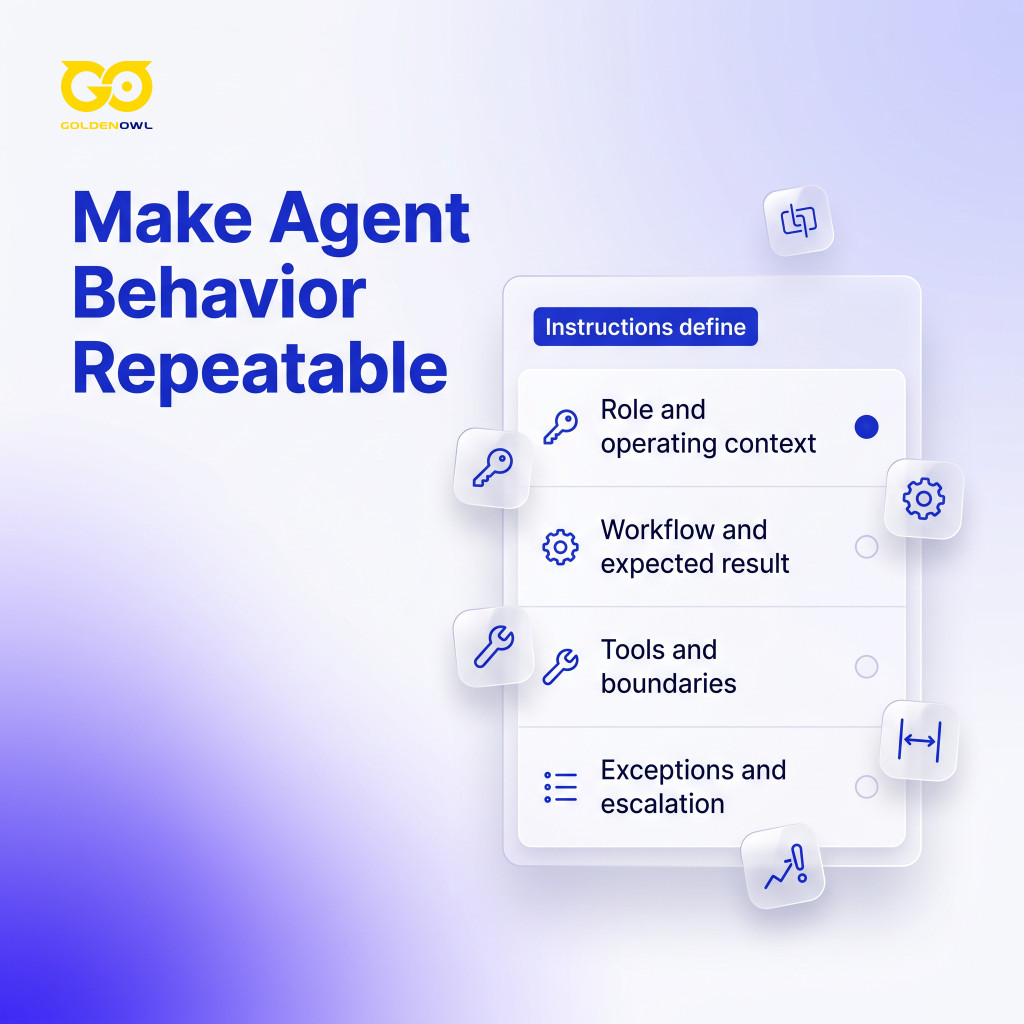
Write uncertainty into the instructions too. Say the agent can’t confirm who a customer is. Tell it to ask for the missing details instead of guessing, and if two records for the same person disagree, to flag them.
It’s tempting to build the whole agent in one go, and that nearly always reaches too far. Your SOP from Step 1 works as a map here. Go through it, mark every decision, and circle only the ones where a large language model (LLM) actually has to reason. Of those, pick the one that matters most; for the support agent it might be sorting incoming requests into the right queue. That’s your minimum viable product (MVP), the smallest version worth building, and your first job is a prompt that gets that decision right.
Overbuilding is a common trap. Even Anthropic Engineering saw its early research agents spawn 50 subagents for simple queries. The team began small, testing about 20 real-use queries by hand. As the team puts it, “Human evaluation catches what automation misses.” So get one prompt working on hand-fed data before you build anything around it:
- Feed in the data or context by hand for now, and leave automation for later.
- Run the prompt against your examples from Step 1, across the common cases.
- Put your effort into the reasoning, since it is the hardest part to repair once tools are attached.
Step 4: Connect external tools
Connecting tools is what turns a working prompt into an agent. In the support example, the model might write a SQL query, a request to your database, to pull a customer’s order history, or produce a JSON object that triggers an API call in your ticketing system.
Give it clear rules for picking its next move from what each tool sends back, and it can work through a task without anyone scripting each turn.
Once the prompt works on hand-fed data, connect real inputs. For the support agent, that’s the ticket and the customer’s account history, which it will usually reach through an API or a database.

Only add tools the task needs, and test them one at a time. When something misbehaves later, you’ll know which one to blame.
Tools also carry different levels of risk. Looking up a single customer record can’t do much harm, whereas a tool that edits every customer can, and an agent that drafts an email is a lot safer than one that hits send. Give it the draft tool first; it can earn the send button later.
Hand over less data than feels natural. Too much of it slows the agent and raises costs, and it can bury the one fact that matters, since the more documents you add, the likelier the key one lands in the middle. Liu et al. showed this in question-answering tests: GPT-3.5-Turbo scored 75.8% with the relevant document first among 20, and 53.8% with it in the middle. Nothing about the information changed, only where it sat.
Give search tools clear, separate names, such as “Search Product Docs” and “Search Support Tickets,” so the agent knows which source to pick. Vague names make it guess.
For lookups, stick to read-only access. Some jobs do have to change things, like setting up an account or syncing CRM records, and for those the agent should propose each write and park it in a queue until someone checks it. According to Microsoft Learn, Azure SRE Agent gets read access by default and requires approval in Review mode before it executes a write action, meaning any step that changes a system.
Step 5: Test edge cases
Run tests through the whole workflow, queued writes included, and mix routine tickets with awkward ones such as these:
- A required field left blank
- The same customer entered twice
- Two instructions that contradict each other
- A tool that’s offline
- A message far longer than usual
- Input written deliberately to trick the agent
Each time, the question is whether the agent stops and asks for help where a person would.
Clean inputs hide the failures that matter. A tool that returns nothing, or an error code the model has never seen, can send it into inventing parameters or retrying over and over. You’ll only catch that if your tests include it. A demo that works on tidy data is where testing starts.
Keep a representative test set, and rerun it after every change. That means the prompt and the model, but also any tool or data source. Even a small prompt edit can break things. Anthropic Engineering found a 3% drop on a broader evaluation set after a system-prompt change had passed its earlier tests, then reverted the prompt.
When manual testing holds up, turn the examples into scripted test cases; a few dozen is usually enough to show where the agent is strong and where it isn’t.

Automated success metrics help, partly because writing them forces you to say what the agent is supposed to do. Still have a person spot-check some results; people notice things metrics don’t.
Once one task chains several LLM calls together, add tracing, which records every step of a run so you can replay it. A tool like LangSmith does this, so a bad answer can be followed back to the step that produced it.
When a test fails, start with the table below.
| Problem | Solution |
|---|---|
| Not finding right info | Give it less, better-matched data |
| Making things up | Tell it to stick to the facts provided; add “okay not to know” |
| Inconsistent format | Add 2-3 output examples |
| Too slow | Use a model without extended reasoning |
| Using wrong tools | Clearer tool names; reference in instructions |
Step 6: Deploy with human oversight
Roll the agent out in stages, and put a person’s approval in front of anything consequential.
A person’s approval belongs before anything public or expensive, legally sensitive or hard to undo. For a support agent, that means refunds and outgoing customer messages; elsewhere it covers file deletions, price changes, published content, and financial commitments.
Whoever approves needs a review screen that is easy to use. Show the proposed action with the information behind it and the agent’s reason for choosing it. A reviewer who has to dig through raw logs will soon start approving without looking.

Start in draft mode, or with staff only. Check the results and record the mistakes, then tighten the workflow before a small group gets limited actions. Salesforce tests its own agents this way. Salesforce starts its release rings with a few hundred employees and does not expand an agent to the full population until it reaches 70% accuracy.
Log the agent’s tool calls, approvals and failures along with what each run cost, so that when someone asks why a refund went out, you can show them. Staff need a quick way to flag a bad result. And keep a manual fallback ready for the day the agent, or a service it depends on, goes down. Keep the tracing on after launch too, since it shows how people really use the agent.
Frequently asked questions
What is the difference between an AI agent and a chatbot?
A chatbot tells you what to do; an agent does it. Ask a chatbot how to change your billing address and you’ll get instructions. An agent calls the API, updates the CRM record, and sends the change to a manager first if it needs sign-off.
Do I need coding skills to build an AI agent?
Not always: no-code platforms take plain-English instructions and let you wire tools together on visual screens, and that gets you surprisingly far. Developers come in when the agent needs its own business rules or private integrations, or tight control over permissions and cost.
What is MCP for AI agents?
Model Context Protocol (MCP) is an open standard for plugging AI applications into tools and data. Our support agent could reach the help desk and the CRM through MCP servers instead of a custom connector for each. The rule from Step 4 still applies, though: read-only by default, and writes wait for approval. A tool that can edit every customer record still needs that queue.
How much does it cost to build an AI agent?
There’s no single price, because the bill follows the route you pick. No-code platforms tend to bill per user per month, usually with a free tier, and their prices shift often enough that only the vendor’s current page is worth trusting. Custom builds spend most of their money on LLM API usage and developer time, then hosting and upkeep.
Conclusion
Most of how to create an AI agent comes down to doing things in the right order. Start with one narrow workflow and the real examples behind it. Fit the model and tools to that job, tell the agent when to stop, and break it with awkward tests before customers get the chance. Then launch slowly, with a person approving anything that matters. If you only do one thing this week, collect those examples. Every later step leans on them.
Share this page


Table of Content

Subscribe to Golden Owl blog
Stay up to date! Get all the latest posts delivered straight to your inbox