
Learn how to hire forward deployed engineers in 6 steps: define the role, benchmark pay, source candidates, screen for delivery and run a four-round loop.


How to Create an AI Program for Team Leads
Nov 9, 2026
about 12 min read

Learn how to create an AI program step by step: define the task, prepare data, choose an approach, test results, and deploy with human review.
Learning how to create an AI program starts with one decision the system has to make, like whether a support email is about billing or a bug. That sounds too small for a big technical project, but it isn’t. Most programs that fail on real input were in trouble before anyone chose a model, because nobody pinned down the task.
What follows is how to make an AI program step by step. It’s for a team with real work to automate, and it goes in order: the task, then inputs and outputs, then what success and failure look like and who checks the result.
How to create an AI program that solves one task
Start smaller than feels right: one workflow, one kind of input and an output you can check just by looking at it. Under the hood that’s all an AI program is, software that reads the input and hands back a label, a summary or a draft reply.
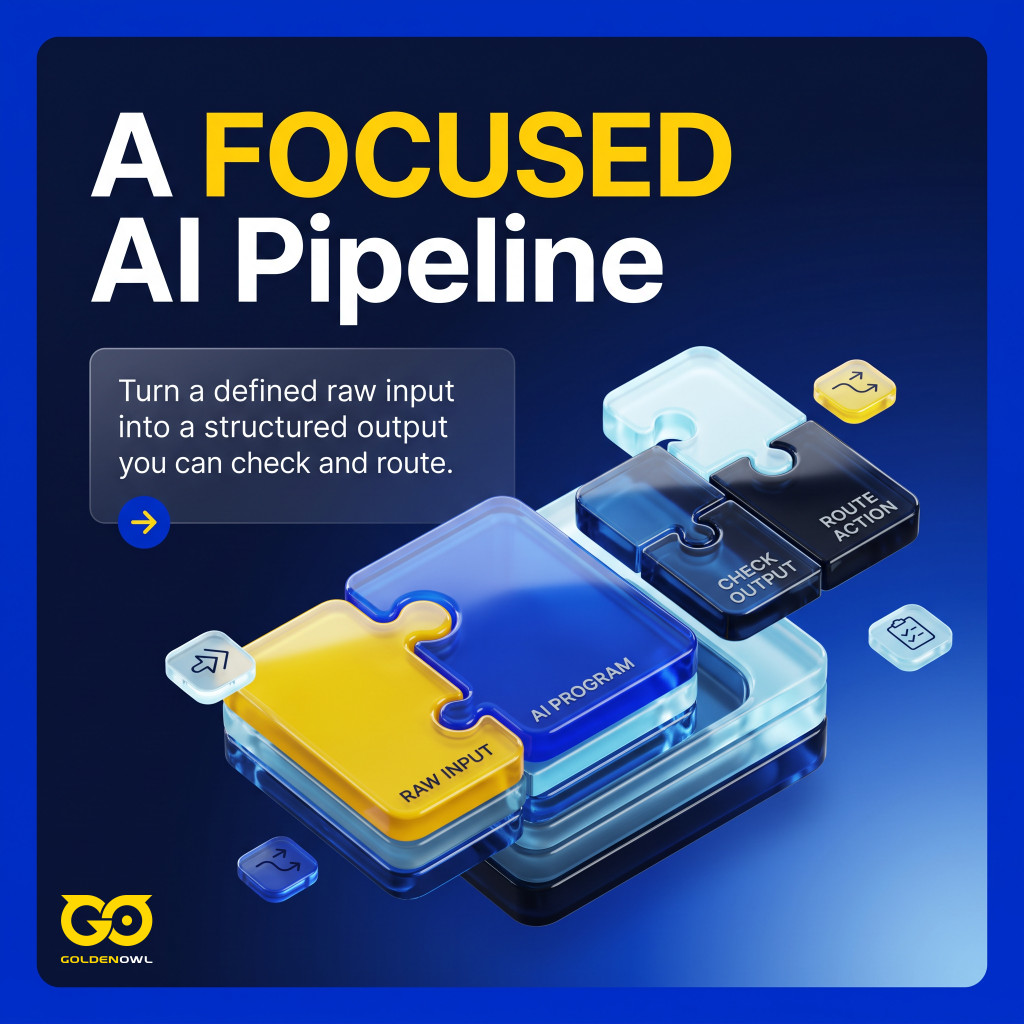
Think of it as a pipeline, then, and not as a new coworker. A clever demo that falls over the first time someone pastes in a strange email doesn’t help anyone. A tool that sorts one kind of email correctly every day does.
Step 1: Define a single narrow problem
Pick one decision point where the answer is clearly right or wrong, so the program gets a defined input and hands back something you can check. “I want to create an AI program for customer support” doesn’t meet that bar, and neither does “Build me an AI assistant.” Those are categories, and you can’t test a category. Before anyone writes code, put four things on paper: what goes in, what comes out, how you’ll know it worked, and where a person looks at the result. Once that first workflow holds up you can add more, though each new task brings its own ways to fail.
Now compare a version you could hand to a developer:
“Create an AI program that reads incoming support emails and labels each one as billing, technical issue, cancellation, feature request, or urgent complaint. The output should be a category, confidence score, and one-sentence reason.”
That wording makes the task testable. Run it on 100 real support emails and compare its labels with the ones your team would have picked. The weak spots show up quickly.
Check the idea against five framing points first:
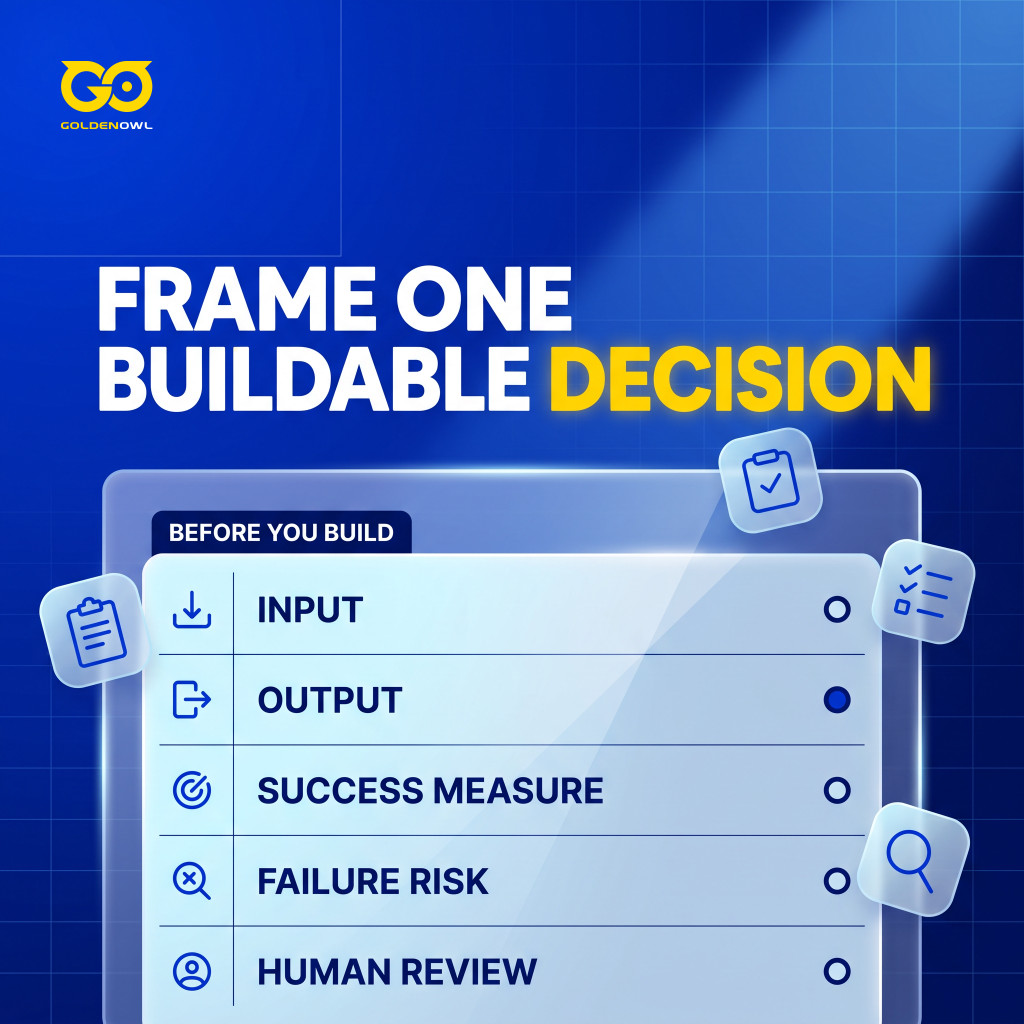
- Input: What does the program actually get handed?
- Output: What should come back out?
- Success measure: How will you tell a good output from a bad one?
- Failure risk: What breaks if the AI gets it wrong?
- Human review: Who signs off on which outputs, before anything happens?
A goal needs the same treatment. Say the plan is for an AI chatbot to handle the common tier-one tickets (routine first-line questions) so that human response times drop by 30% within six months. You know the problem and the measure from day one.
- What’s the exact problem? “Better lead scoring” is a wish. A target looks like this: “Build a model that can predict which leads have an 80% or higher probability of converting.”
- How will you measure success? Write the Key Performance Indicators (KPIs) down before building. Accuracy can be on the list, but a business number such as lower operating costs is often the better one to watch.
Chatbots follow the same rule. “We want a chatbot” gives nobody anything to test, but “it should answer five questions about this topic” does.
Step 2: Audit and clean your data
Machine learning is software that learns from past examples rather than from rules someone wrote. That makes the examples the whole game. Each needs a known input and the right outcome; get either one wrong and the model learns the wrong lesson.
Five common problems can break those examples:
- Unclear labels: The same case gets different labels from different people.
- Missing values: Important fields are blank or inconsistent.
- Data leakage: Information unavailable at prediction time gets included by accident.
- Biased samples: Training data fails to represent future inputs.
- Overfitting: The model aces old examples and stumbles on new ones.
It’s a little humbling, but a plain model on clean, relevant data usually beats a fancier one fed poor data. That is why cleanup comes first, and the first pass is mostly basic work.

- Handling Missing Values: A customer record may lack an age, or a purchase history may be missing a date. Those gaps can’t simply stay there. Depending on the case, fill them with a mean or median value, or drop a record entirely if it has too many holes.
- Correcting Inaccuracies: Typos happen everywhere. If “New York,” “NY,” and “new york city” all show up, the model sees separate places until someone standardizes them.
- Dealing with Outliers: Average purchase $50, one entry at $1,000,000? That one row can drag the whole model off course. Remove it, or soften its pull with a statistical method.
Clean data then gets shaped through feature engineering. That means turning raw columns into more useful features (the inputs the model learns from) so it can see the real problem. A raw “customer sign-up date” may not tell the model much on its own, but “customer tenure in days” is useful when predicting customer loyalty. In the same way, “number of logins” combined with “last login date” can become a “user engagement score.”
Four preprocessing tasks support that work:
- Fill missing values or remove the affected rows.
- Remove duplicate entries.
- Turn text data into numbers.
- Rescale features, so a column with big numbers doesn’t drown out the small ones while the neural network learns.
Step 3: Choose the right approach: no-code, APIs, or model training
Apart from no-code tools for simple jobs, most teams choose between three options. They call an off-the-shelf API, fine-tune a model someone else built, or train their own. The task decides most of it, then your data, budget and skills.
As a rough rule, start with a commercial API for ordinary language work, like reading and sorting text. Building your own model makes sense in fewer cases: when the project runs on your own spreadsheet-style data, or when compliance rules say the system must run offline, without an outside service.
An API-first AI program uses a model run by another company. The model sits on that provider’s servers. Your software sends it the input and gets an answer back, then your own code decides what happens next. (An API is how one program asks another for something.) For most text, document, code or chat work, this is usually the fastest way to start, and many chatbots, research assistants and text tools begin as this kind of AI program.
An API program has four parts:
- A user input or system trigger.
- A prompt (the written instructions that tell the model what to do).
- A call to the AI model, through its API.
- A last step that checks the output, then stores it, shows it or passes it on.
Training your own model makes sense when the data sits in rows and columns and the question has a clear answer: will this lead convert, is this transaction risky, what will demand look like, which products belong together. You rarely need a giant neural network for numbers like these. Classic statistical models, such as logistic regression or random forests, can be more reliable here than a large language model.
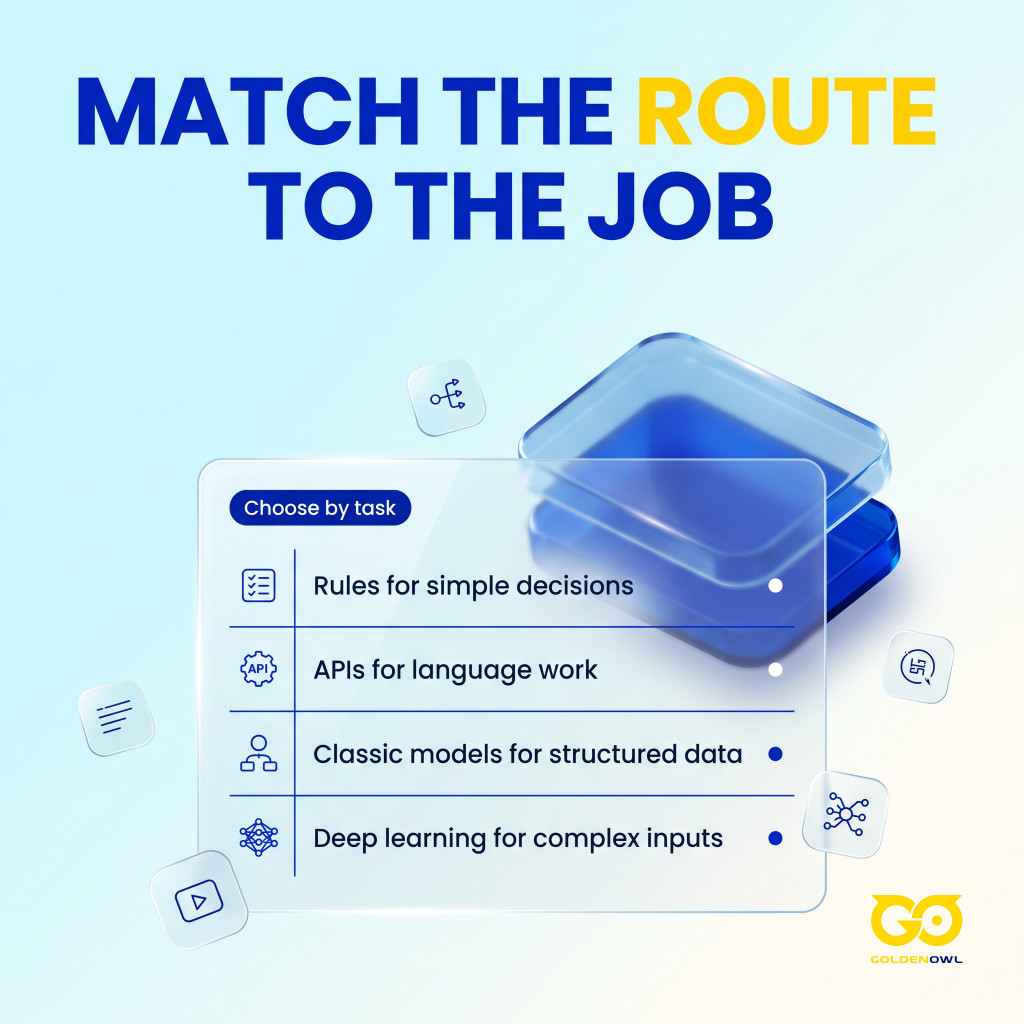
And sometimes the answer is no model at all. If the decision logic is simple and doesn’t change, plain if-then rules (a rules engine) tend to be cheaper, safer and easier to debug. Think of an invoice over £10,000. The AI’s job is to read the amount off the document. The rule that it needs sign-off should be a fixed if-then rule that anyone can look up.
Transfer learning (the fine-tuning option above) sits between calling an API and training from scratch. Someone else already trained the model on a huge dataset, say images from all over the internet, and you fine-tune it with your own examples. You don’t have to collect terabytes of data yourself.
Images, audio and free text don’t fit neatly into rows and columns. When an API can’t handle that kind of unstructured data, you may need deep learning (large neural networks), and that’s the job TensorFlow and PyTorch were built for, since training them takes a lot of number-crunching.
Frameworks are code libraries developers use to build models. Here are the three main ones.
| Framework | Best For | Ease of Use (Beginner) | Key Feature |
|---|---|---|---|
| Scikit-learn | Traditional machine learning, data mining, and statistical modeling with structured data. | Very High | Its simple, consistent API makes it easy to implement dozens of algorithms with just a few lines of code. |
| TensorFlow | Production-ready, large-scale deep learning models, especially for image recognition and NLP. | Medium | Backed by Google, it offers a robust ecosystem ( TensorFlow Extended) for deploying models in real-world applications. |
| PyTorch | Research, rapid prototyping, and flexible deep learning development. | High | Developed by Meta AI, its “Pythonic” feel and dynamic computation graphs make it intuitive for experimentation. |
In practice, the data type decides the framework. If your data lives in spreadsheets, that usually means Scikit-learn; if it’s images, audio or free text, it means TensorFlow or PyTorch.
Step 4: Train and evaluate the model
If you train or fine-tune a model, it has to pass one test. It must beat a baseline (a simple benchmark, such as always guessing the most common label) on held-out data (examples it never saw while learning), judged by metrics that suit the task. So split the dataset before training. If everything goes in at once, the model can memorize what it saw and then fail on anything new.
Usually the data is split into three sets:
- Training Set: The biggest slice, usually 70-80% of the data. This is what the model learns from.
- Validation Set: Often 10-15%, a smaller portion used to tune the model’s settings during training without giving away the final exam.
- Testing Set: The remaining 10-15%, locked away while the model learns and used only at the end for an honest grade of real-world performance.
Training then runs as a loop. The model looks at a batch of data, makes a guess, checks how wrong it was and adjusts its internal settings a little, over and over.

Accuracy (the share of predictions the model gets right) sounds like the obvious score. It isn’t, when the outcome is rare. Picture a disease that only 1% of people have. A model can simply predict “no disease” for everyone, reach 99% accuracy and still miss every person who needs help.
A richer set of metrics shows what the model is really doing:
- Precision: When the model says “yes,” how often is it right?
- Recall (or Sensitivity): Out of everyone who really had the disease, how many did the model catch? Low recall means it’s missing the cases you care about.
- F1-Score: Precision and Recall rolled into one number, handy when the data is lopsided, as in the disease example.
For a regression task (predicting a number, such as next month’s sales), mean squared error is one metric you can use; it grows as the predictions land further from the real values.
Step 5: Apply guardrails and evaluate realistic failure modes
Put the guardrails in the code. A prompt can ask the model to behave. It can’t make it, and a model with only instructions to go on may still fill an empty field with an invented value, or guess when the text contradicts itself. Checks written into the program are what stop that bad data before it lands in your database.
The usual guardrails look like this:
- Output validation: JSON (a common structured data format), labels, fields and required values all present and correct.
- Confidence thresholds: Low confidence means a person looks at it.
- Human approval: Required before any email, refund, record change or published content goes out.
- Input limits: Inputs that are too big, unsafe, broken or in an unsupported format get turned away.
- Cost limits: Cap usage per user, workflow, day or account.
- Logging: Keep a record of inputs, outputs, model settings and errors (where that’s appropriate).
- Privacy controls: Personal or sensitive data stays in-house, unless an outside system can’t do the job without it.
Human approval is the one not to cut early. Anywhere a wrong answer could cost money, damage trust, expose private data or trigger something a customer sees, a person stays in the loop. That check comes out only when there’s real evidence it isn’t needed. Low-risk outputs are the easiest place to collect that evidence.

Test only the happy path (the clean, expected case) and even a weak AI program looks impressive. Real inputs are messier. That’s where the failures are.
A useful test set mixes in:
- Clear examples where the answer is obvious.
- Ambiguous ones, where two people on your team might disagree.
- Messy ones, with typos, missing fields or strange wording.
- Edge cases that should return “unknown” or “needs review.”
- Bad inputs that should be rejected safely.
A classifier needs its accuracy checked category by category. It might nail billing labels and fumble urgent complaints, and the overall number would still look fine.
Generative AI (models that write text rather than pick a label) is harder to grade. You’re looking for answers that are consistent, true, in the right format and genuinely useful, plus refusals in the right places. A simple habit helps after each test: ask yourself whether you’d trust that output without checking it. If you wouldn’t, the AI program needs tighter constraints or a human review path.
Step 6: Deploy with human review and monitor performance drift
Launch the AI program with a person reviewing its output and someone watching for performance drift. Only widen the rollout while results hold up. The first version should be small: one team, one workflow, one dataset or one type of request. That’s enough for feedback without exposing the system to every way it could fail.
A sensible release goes in stages, from a proof on sample data to monitored production:
- Local prototype: Sample inputs only, to prove the AI can do the job at all.
- Internal test: A small group tries the program on real examples.
- Human-reviewed workflow: The AI drafts the output, and a person approves it before anything happens.
- Limited automation: Low-risk cases run on their own once they clear a set confidence threshold.
- Monitored production: Errors, cost, feedback and performance drift all get tracked.
The staged approach can look slower. It avoids a familiar failure, though: the clever AI tool that users stop trusting after three bad outputs.
One common way to deploy a model is to wrap it in an Application Programming Interface (API), the same kind of connection described in Step 3. Other software sends a request with new data, and the AI sends back a prediction. Python tools such as Flask or FastAPI make this surprisingly manageable.
The usual hosting options include:

- Cloud Servers: Renting a virtual machine from a provider such as AWS or Google Cloud is a common, flexible starting point, and you keep full control over the environment.
- Containers: Tools such as Docker package your AI program and everything it needs into one tidy “container,” so it runs the same way in production as it does on your laptop (and nobody has to say “but it worked on my machine!”).
- Serverless: When a model only needs to make predictions now and then, a serverless setup can save a lot of money, since you pay only for the moments your code actually runs.
Deployment is a milestone, not a finish line. The world keeps changing, and so does the data your model sees, which means performance will slowly degrade through model drift. A fraud detection model trained on data from 2023 won’t know how to spot the new scams that show up in 2025. So the program can’t be launched and forgotten. Keep watching the model’s accuracy and other performance metrics, and when they dip, retrain it with fresh data.
Frequently asked questions
Can I create an AI program without coding?
Yes, for simple AI workflows, prototypes and internal tools. No-code automation tools, chatbot builders, spreadsheet add-ons and AI workflow platforms can handle that kind of work. Once you need complex logic, strict checks, a custom interface or real monitoring in production, you will usually need code.
Should I train my own AI model?
Usually not for a first AI program. Start with a pre-trained model or an API unless you have a clear dataset, a measurable target and a reason existing models can’t handle the task. Training can make sense for structured prediction, classification at scale, private data workflows or very specific behaviour.
How much data do I need?
A generative AI prototype may need only good instructions, example inputs and a test set. For traditional machine learning, the amount depends on how complex the task is and how good the labels are. A small, clean dataset can support simple classification, while noisy labels or rare outcomes call for more data and careful evaluation.
What is the easiest AI program to build first?
A text classifier is often the easiest useful AI program to start with. It takes a clear input, returns one of a fixed set of answers and is simple to evaluate. Support ticket routing, review sentiment, lead type classification, content tagging and document triage (sorting incoming files by type) all fit the pattern.
Conclusion
Knowing how to create an AI program comes down to keeping the work small and checkable: choose a bounded workflow, keep its inputs clean, verify the outputs and watch its accuracy after launch. A good next move is to pick the smallest workflow you can measure, try the lightest tool that handles it and keep a test set close by. Code, model training and more data can come later, once the task shows it needs them.
Share this page


Table of Content

Subscribe to Golden Owl blog
Stay up to date! Get all the latest posts delivered straight to your inbox