
An AI legal assistant does the first pass of legal work. See what it can and can’t do, and which legal AI tools fit research, contracts, or practice management.


AI Driven Enterprise Search Solutions: 8 Best Platforms
Sep 8, 2026
about 20 min read
Explore the best AI driven enterprise search solutions, compare platforms, features, costs, security, and implementation strategies for your business.
Swap manual folder navigation across your entire enterprise for direct, contextual answers.
An AI driven enterprise search solution connects your isolated repositories by piecing together scattered records and deciphering what users actually mean. Once you've hooked those repositories together, modern platforms eliminate all the routine friction of browsing through disconnected storage systems.

Leading AI driven enterprise search solution options
Enterprise discovery systems now bypass old blue-link directories entirely and return concrete operational answers directly to your team. Under the hood, these engines ingest contracts, legacy databases, ERP tables, CRM pipelines, and email records, weaving them into one unified, indexed retrieval fabric for everyday work.
Capital allocators are pouring massive budgets into internal discovery tech right now. According to research from S&S Insider, the enterprise search market will grow from $4.61B in 2023 to $9.31B by 2032 as unstructured records multiply, with broader ai enterprise solutions anchoring that trajectory across an ongoing $58 billion reordering of productivity platforms. Market forecasts suggest that close to 40% of corporate software suites will integrate autonomous workplace bots this year.

Finding everyday business documentation remains a constant bottleneck inside almost every company I talk with. According to Gartner, 47% of desk-based employees face difficulties surfacing essential work resources, while Slite discovered that traditional lookup tools answer an initial search successfully only 10% of the time. Meanwhile, across specialized business units, 38% of staff get stranded navigating siloed repositories, which slows overall team momentum and spikes error rates.
Technical buyers split their software infrastructure into two operational camps before cutting purchase orders. On one side you have packaged end-user tools handling user queries, model reasoning, and citations, while vector databases sit on the other side as raw backend infrastructure for developers.
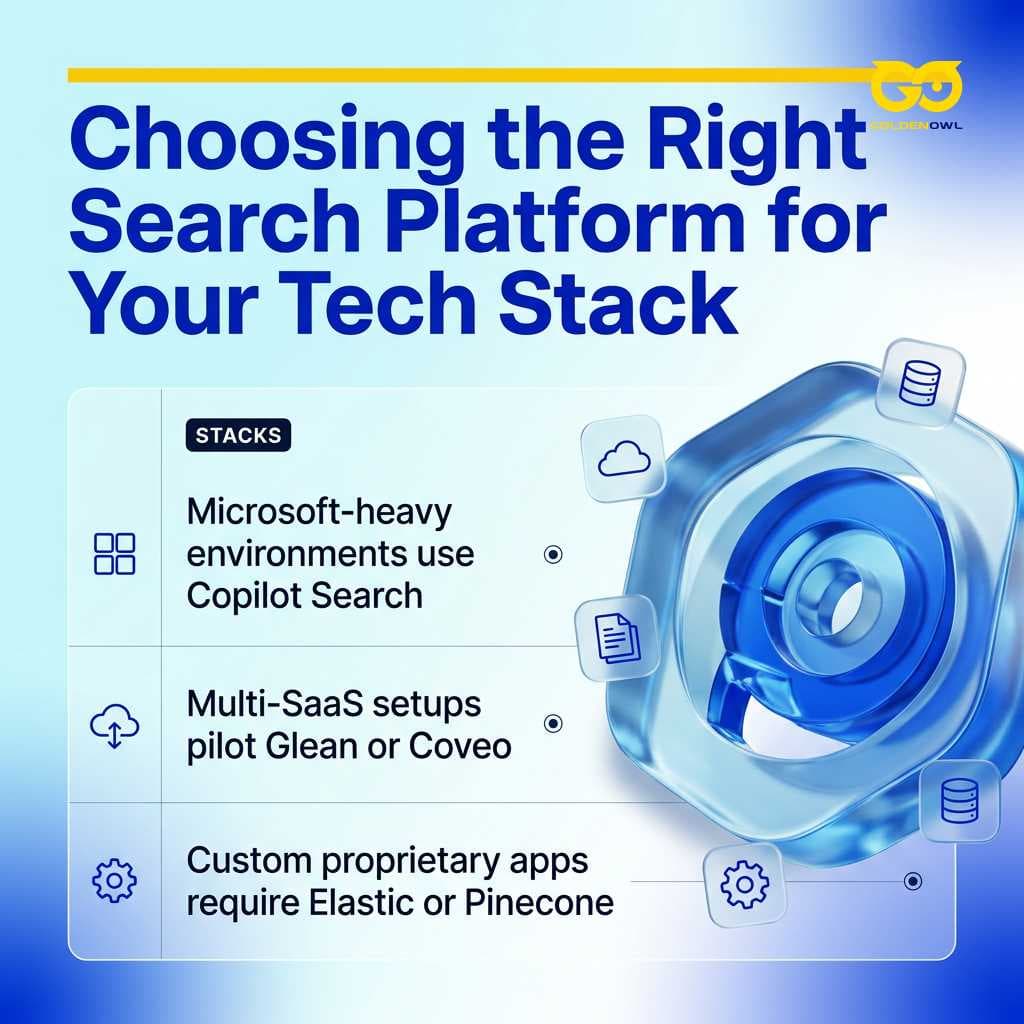
Choosing the right platform depends entirely on your existing operational software stack:
- Microsoft-heavy (SharePoint, Teams, Outlook): Start with Microsoft 365 Copilot Search to minimize integration friction.
- Multi-SaaS spread across 20+ apps (Slack, Jira, Google Drive, Salesforce): Pilot Glean or Coveo to get out-of-the-box cross-app indexing.
- Custom proprietary apps or internal dev portals: Choose Elastic or Pinecone if your engineering team requires bespoke ranking models and full API control.
Multi-agent search platform
Hebbia created a verticalized research system aimed specifically at financial institutions, giving investment analysts a direct path to query, extract, and synthesize dense records across internal deals and external filings. Their architecture centers on Browse, an indexed repository built to handle document-based search and retrieval across massive enterprise datasets.
Core platform capabilities include:
- Fully-indexed repository for documents: Hebbia's Browse feature creates a unified, searchable index of all your firm's documents, including PDFs, spreadsheets, and presentations for instant retrieval. Teams search across millions of pages in seconds, with every result ranked by relevance and linked directly to source passages.
- AI-powered financial research: Hebbia uses natural language processing and a multi-agent system to synthesize insights from complex financial filings. The software answers nuanced questions, accelerates diligence workflows, and handles multi-document queries like debt covenant comparisons or trend tracking across historical management commentary within seconds.
- Iterative Source Decomposition (ISD) for scalable multi-document processing: Hebbia preserves document context, structure, and formatting to enable multi-step reasoning across large datasets. The engine breaks files into discrete segments while maintaining relationships between sections, tables, and footnotes intact to produce accurate, citation-linked audit drafts.
- In-line citations and full audit trail: Every answer links directly to its source text to guarantee transparency and auditability for regulated financial institutions. Analysts click straight through to the exact page and paragraph where underlying data originated, while the platform logs every query for mandatory compliance reviews.
- Enterprise-grade security: Hebbia adheres to strict operational standards, including SOC2 compliance, GDPR rules, and end-to-end encryption across all firm records. The platform supports granular role-based access controls, zero data retention policies, and isolated deployments for institutions managing strict internal information barriers.
When you run a software evaluation in 2026, enterprise AI search contracts generally scale from $3 to over $100 per user per month, though enterprise vendors keep sticker prices quiet and lean hard on custom negotiations tied to seat minimums. Amazon Q Business anchors the bottom tier with a basic Lite plan at $3/user/month. If you need their Pro tier with 40+ connectors, native assistant tooling, and serious file analysis, the price steps up to $20/user/month. Dedicated workspace platforms like Glean take a completely different commercial path. An evaluation of 159 vendor transactions by Vendr revealed that customer agreements for Glean center at a midpoint value of $97,500 each year, which shakes out to an effective rate around $25, $40/month per seat. On a baseline 100-user rollout, that creates a 4× cost disparity between Amazon Q Business Pro at $24,000/year and Glean's $97,500 commitment.
Coveo
Customer support centers, self-service portals, and digital retail storefronts serve as the primary homes for Coveo across modern corporate deployments. Machine learning handles ranking so customers find answers without manual intervention.
AI search for digital commerce
Coveo shapes product catalog discovery around individual browsing sessions, physical location, and purchase signals to lift conversion figures and curb cart abandonment.
Behavior-based relevance tuning
The software continuously refines result orderings by tracking customer dwell time, click behavior, and verified transactions rather than asking human administrators to maintain static relevance rules.
Unified content indexing
Engineers connect Coveo to customer relationship software, help desks, and merchandise feeds so internal staff query everything through one consolidated screen.
Elastic
Elastic runs as an open, distributed discovery and analytics cluster designed to swallow massive piles of operational data without flinching. Engineering groups use the software to trace application telemetry, parse system logs, and run low-latency queries across production environments holding petabytes of data.
Splitting indices into distributed shards lets your developers search terabytes of raw logs and billions of individual documents in milliseconds. Built-in administrative consoles give operations leads immediate visibility into search latency, cluster load, and query volume across every node, connecting search telemetry data to business analytics solutions with embedded generative ai.
Hybrid keyword and vector retrieval preserves exact precision for identifiers like error codes while capturing conceptual queries, but maintaining dual indices demands higher memory overhead and regular tuning.

Running an Elastic deployment requires real infrastructure talent, custom deployment scripts, and ongoing cluster management. Your developers have to install the clusters on cloud instances or bare metal and build the user experience themselves, which makes it ideal for backend developers rather than non-technical business units.
Guru
Go-to-market teams in enterprise sales, account management, and customer support use Guru to distribute verified answers without constant shoulder-tapping. The product structures internal operating facts into modular cards that owners review, tag, and publish across company departments.
Knowledge workflows inside Guru center on three specific platform capabilities:
- Card-based knowledge management: Guru organizes company information into discrete cards categorized by topic, team, or workflow, allowing your operational contributors to locate and update specific internal knowledge without friction.
- AI-powered internal search: The platform surfaces relevant cards by evaluating user search queries, live conversation context, and role-based workspace access permissions.
- Knowledge verification workflows: Guru automatically flags stale documentation cards and prompts designated content owners to review and certify operational data accuracy.
By surfacing verified reference cards directly within Chrome, Slack, and Salesforce, Guru places approved institutional answers right inside an employee's daily workflow, completely bypassing manual deep-dives through messy shared folders.
Algolia
Product teams reach for Algolia when they need a hosted search API to power frictionless discovery inside customer-facing web and mobile applications. Its customizable ranking controls and built-in typo tolerance make it a standard choice across e-commerce storefronts, SaaS products, and media properties.
Search API for applications
Algolia provides REST endpoints alongside software development kits for JavaScript, Python, and Ruby, giving your developers a clean path to wire up responsive search experiences inside consumer applications with minimal friction.
Instant, typo-tolerant results
The engine returns matching records instantly with every keystroke, correcting common misspellings, plurals, abbreviations, and synonym variants on the fly.
Rich faceting and filters
Dynamic faceted filters let consumers refine catalog results across multiple categories, specific inventory attributes, and pricing brackets without refreshing pages.
Frontend developers can focus entirely on customer user flows while Algolia takes care of index management and scoring behind the scenes. Billing scales with your stored record count and API operations, keeping latency tiny for customer-facing digital storefronts rather than resolving complex cross-app workplace workflows across messy internal drives.
IBM Watson Discovery
Enterprise operations groups deploy IBM Watson Discovery to parse dense unstructured corporate records, technical specifications, vendor agreements, and complex regulatory paperwork. The platform extracts named entities, industry phrases, and semantic ties straight out of sprawling documentation archives.
The platform processes complex business documents through three core functions:
- NLP-enriched document search: Discovery applies natural language processing to identify sentiment, entities, and concepts, tagging raw enterprise text with structured operational metadata.
- Domain-specific data enrichment: IBM supplies pre-trained industry models that recognize financial terminology, standard document formats, and compliance requirements out of the box. Teams can also train custom machine learning models on internal records to increase accuracy for proprietary workflows.
- Table and passage extraction: The platform extracts complex tables, charts, and relevant passages from PDFs and scanned records, converting messy unstructured pages directly into clean structured operational data.
Pinecone
Pinecone gives developers a fully managed vector database that acts as the foundational retrieval backbone for semantic discovery and internal question-answering systems. The software matches mathematical embeddings to return conceptually aligned records across millions of stored data points within milliseconds.
Unlike relational databases that match exact text strings, Pinecone retrieves conceptually similar records based on calculated vector distance.
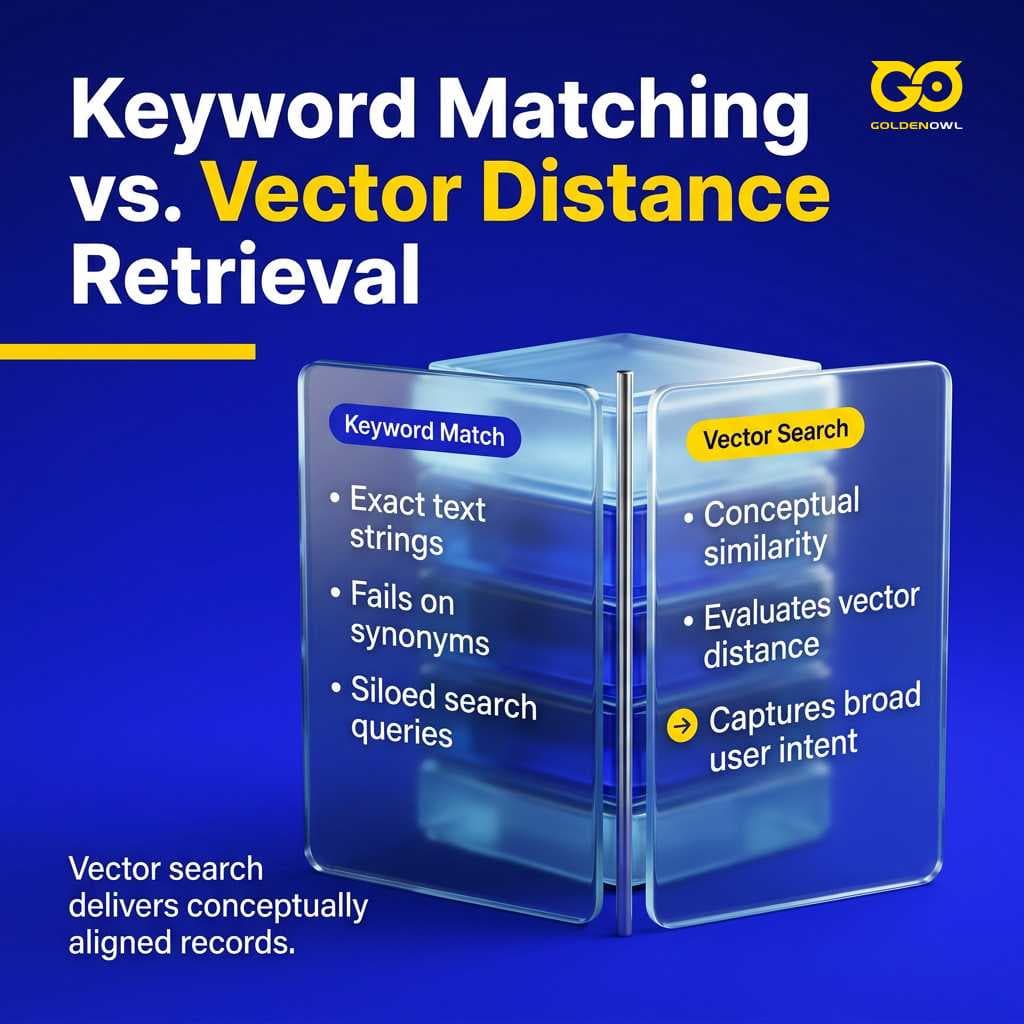
Vector retrieval lets you build conversational search across company archives without forcing users to guess the exact keywords used in the source text. A prompt asking for companies with solid free cash flow pulls up relevant balance sheets even if that exact terminology never shows up in the filings. Your engineering team builds the front-end application logic, while Pinecone manages vector clusters and scales storage capacity automatically as query traffic shifts.
Glean
Glean indexes over 100 workplace applications (think Slack, Salesforce, Google Drive etc) to create a single cross-platform index over disconnected corporate systems. Team members query that centralized graph directly instead of losing valuable hours figuring out where a particular asset lives.
Three foundational components power the platform's workplace search:
- 100+ app integrations: Glean connects to Google Workspace, Microsoft 365, Slack, and dozens of specialized workplace applications out of the box.
- Enterprise Graph knowledge model: The system constructs an internal graph mapping relationships between individual employees, documents, projects, and functional topics across all connected tools.
- Personalized AI work assistant: Glean analyzes user behavior patterns and team workflows to personalize query results and proactive content recommendations.
The system decodes company jargon, organizational reporting lines, and current team rosters to personalize query rankings for each specific employee. Proactive cards push active project documents and verified answers right to the dashboard before a person runs a manual lookup.
Core capabilities of enterprise AI search
Across modern enterprise environments, search engines rely on machine learning, natural language processing, and large language models to index, interpret, and pull records from scattered company repositories. Because they decode user intent directly, your team gets critical information without having to memorize file paths or type rigid search syntax across separate tools.
Legacy workplace tools dump lists of links that force your staff to go hunting across files. AI search synthesizes those source documents to deliver direct answers, giving anyone who types a plain-language question an immediate operational fact instead of an unstructured reading assignment.
Every daily query makes the platform sharper over time, since the engine notes which documents people open and which ones they ignore. Tracking how users rephrase their searches feeds continuous interaction data back into relevance algorithms, establishing a baseline performance level that standard keyword systems simply can't match.
Multi-system data connectors
Federated search brings company silos together by querying scattered internal databases at the same time through a single search window.
Querying records directly inside source systems lets you run searches without building a centralized index. Unified search takes the opposite path by pulling records into one central repository, giving workers instant cross-platform results from a single entry point.
Connected repositories typically encompass:
- CRM systems like Salesforce and HubSpot
- Productivity tools like Confluence, SharePoint, and Google Workspace
- Communication platforms like email, Slack, and Teams
- Enterprise systems like SAP, Oracle, and legacy databases
- Unstructured content like contracts, PDFs, and reports

Modern search platforms ingest company records across your tech stack through two main setups: push architectures and scheduled pull connectors. Have your engineers push fresh records directly into search APIs for fast indexing, while pull connectors crawl target directories on a fixed schedule. Some modern engines also tap into live search driven by AI reasoning, pulling data on demand to avoid storing massive central indexes.
Unstructured content extraction
Unstructured content like emails, reports, PDFs, and contracts makes up roughly 80% of enterprise information. These files multiply at 3x the pace of structured databases, yet standard search tools merely catalog their storage paths without indexing the underlying text.
A few fundamental technologies turn these messy files into clean, searchable records:
- Sentence tokenization, named entity recognition, and sentiment analysis within natural language processing pipelines break text into structured components.
- Extraction models identify critical entities across enterprise files, including people, organizations, dates, and geographic locations.
- Contextual language analysis resolves ambiguous user queries by evaluating surrounding terms and semantic context.
Context-aware ranking
Because keyword density alone can't accurately measure relevance, AI search evaluates operational roles, team rosters, document recency, and broader corporate patterns to decide which results rank highest.
Role-based conditioning Identical terms return disparate results depending on employee department and role. Consider when a finance analyst and a sales rep search for the exact same term like contract: the platform tailors its response by evaluating user identity to decide whether they need supplier, customer, or employment agreements, using those context clues to return role-appropriate answers.
Vector distance scoring Vector search maps words, phrases, and whole documents into numerical values called vector embeddings to capture their core meaning. The k-Nearest Neighbor (kNN) algorithm then locates matching records by calculating mathematical proximity across multiple dimensions. Most organizations run hybrid search setups that pair this semantic distance directly with traditional keyword matching, balancing broad conceptual intent against exact word precision.
Balancing discovery and personalization Personalization factors in your previous search history, active project assignments, and team affiliations to rank critical information first. Great platforms balance this individual relevance against broad discoverability, ensuring staff keep full access across organizational knowledge bases without getting trapped in restrictive filter bubbles.
Enterprise search evaluation and implementation
Implementing an AI driven enterprise search solution requires an operational commitment that goes far beyond routine IT purchasing. Your staff will simply drop any search software the minute it stops supporting their everyday workflows.
Smart operators make better software decisions by sizing up systems across integration depth, security controls, and answer quality long before believing vendor marketing claims. Turning static records into fast business action is the real job of search. Backed by solid governance and permissions, search gives you the actual foundation for scaling AI.
Workforce adoption falls apart the second people have to launch a separate browser tab or jump into an isolated app. Keeping usage high takes smooth integrations, quick sharing tools, and saved searches, whereas a friction-heavy interface just pushes your team away.
Technical evaluation criteria
A disciplined review of core technical attributes helps your team cut right through sales pitches.
Assess integration capabilities
Check right away whether the platform plugs into the places where your team actually stores files every day. Buyers must gauge connector breadth, legacy system support, and integration fit across the existing software stack. Map out your entire data footprint across emails, internal network drives, spreadsheets, scanned PDFs, deal rooms, and live feeds to confirm candidate systems index every format while preserving access rules through ACL synchronization. Look closely at table extraction accuracy, OCR on scanned records, and how reliably the index handles documents exceeding 1,000 pages.
Evaluate AI and NLP features
Direct questions drawn from daily operations offer the most reliable way to test natural language understanding. When you sit through live demos, run searches taken straight from recent deals or active projects to see how well it decodes industry jargon and returns factual answers. Skip the canned demo queries and push hard on complex questions that pull from multiple records or dig specific numbers out of messy financial files. Put the platform through edge cases like footnotes, numerical comparisons, and cross-file synthesis to gauge how it holds up.
Verify citation transparency and accuracy
Insist on clear answers backed by clickable source citations and in-line citations instead of accepting unverified summaries. That transparency makes or breaks internal adoption, given that 85% of teams trust AI outputs only when answers tie directly to original source records.
Review security and governance requirements
Audit trails, formal compliance certifications, and inherited access controls are strict requirements if your business touches regulated spaces. Check how each vendor handles data retention schedules, tenant boundaries, geographic storage rules, and encryption across your infrastructure at rest and in transit. Engineers must verify that file permissions set in SharePoint, Box, or local drives carry through to every single search query. Loop your legal and information security teams into these vendor evaluations early, which stops authorization conflicts from freezing your rollout six months later.
Consider pricing and scalability
Figure out whether the vendor bills per seat, by query volume, or through consumption so wider company adoption won't trigger runaway software expenses.
Measure time-to-value and deployment speed
Pin down the exact rollout timeline needed to take a search tool from initial connectors to company-wide production. Great systems deliver clear value within days or weeks, particularly when managed delivery setups take on the heavy lifting of technical configuration and deployment.
Evaluate integrations and user experience
Look at how cleanly the tool runs inside daily work applications like Excel, Slack, Teams, PowerPoint, Outlook, or specialized financial software. Search fails when employees have to stop what they are doing, so check whether answers surface natively in those workspaces instead of forcing users into isolated windows. Evaluators must also confirm people can save repeat searches, share findings with peers, and export raw data directly into spreadsheets and decks.
Phased rollout strategy
A phased software deployment lets larger companies protect system performance, maintain strict compliance, and keep query latency low across every department. Bringing in an ai solutions consultant gives organizations hands-on architectural guidance while running initial pilot tests and integrating backend systems.
Tangled folder permissions across shared drives are almost always the biggest roadblock during early rollout. Cleaning up permission structures and removing orphaned groups before you turn on enterprise connectors stops authorization bugs early and keeps user testing on track across teams.
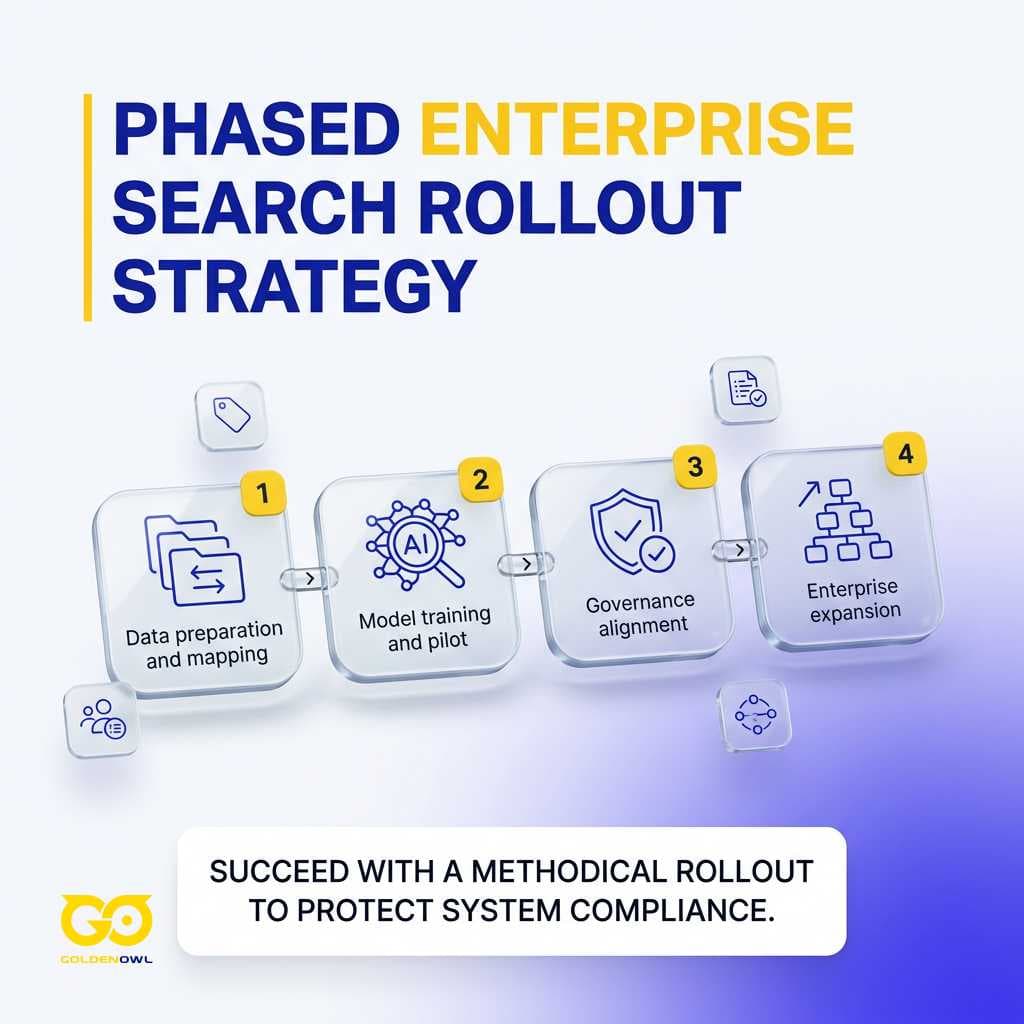
Solid rollouts follow four clear operational stages:
- Data preparation and mapping: Validate metadata, data lineage, and folder access permissions so retrieval systems can index unstructured files stored across your repositories.
- Model training and pilot: Deploy enterprise AI search models into a restricted environment across core knowledge bases to test query precision, user intent recognition, and governance protocols.
- Governance alignment: Establish data handling rules, role-based access, and system audit logs to support secure, explainable search.
- Enterprise expansion: Roll out search access company-wide once governance frameworks, permissions, and system connectors are operating reliably.
Benchmark your pilot results against four specific operational standards before signing any enterprise contract:
- Connector sync stability: Indexes update within 15 minutes of any source document modifications.
- Direct answer accuracy: At least 85% of sampled domain queries provide fully grounded, clickable source citations.
- ACL synchronization: 100% adherence to source-level permission rules across all departmental test cohorts.
- Daily active engagement: At least 60% of pilot participants run operational queries weekly without prompting.
Return on investment measurement
Feature lists matter far less than measurable business results, where cutting decision latency delivers the true financial return. Companies see real ROI on every $1 spent when staff pull up verified records without delay, keeping projects moving forward across the entire firm.
Teams track a handful of financial and operational metrics to gauge enterprise search returns:
- Reduced search time and decision latency: Workers retrieve answers in seconds through indexed repositories, replacing hours of manual folder navigation with relevant, context-rich results.
- Reclaimed workforce hours and capacity expansion: Deploying intelligent search across 15,000 agents saved a large U.S. insurer 6.5 hours per employee weekly, which matched the output of 1,867 new full-time workers and expanded total service capacity by 12.5% without added headcount.
- Capital efficiency and investment return: Organizations average a $3.50 return for every $1 spent on AI initiatives, while high-performing teams push that realized gain to an average of $10.30 for every $1 invested into production search tools.
- Support resolution acceleration: Customer support teams using this technology cut initial response times by 37%, resolve incoming tickets 52% faster, and lift customer satisfaction scores by an average of 19.7%.
- Internal ticket deflection: Internal self-service portals deflect up to 40% of routine HR questions, freeing departmental teams from spending up to 30% of their business hours hunting down internal information.
- Product development acceleration: One major toy and play company cut design cycles by 29% and improved project throughput across development teams by 23%, generating a documented $15 million impact.
- Institutional knowledge retention and high user trust: Valuable institutional knowledge stays accessible across teams when veteran staff depart, with 85% of surveyed employees confirming confidence in factual accuracy whenever systems provide direct citations back to original source files.
Enterprise search departmental applications
When you link operational knowledge across isolated units, you strip away administrative drag and speed up execution inside every core business function you oversee. Field rollouts prove to you that intelligent search targets definite operational needs inside each department.
Customer Support or the Internal IT Helpdesk give you the cleanest starting points when you want immediate operational traction because both teams run on hard daily numbers. When you watch these groups work, they live in ticket queues, keep orderly reference docs, and track daily metrics like handle time alongside first-contact resolution on every shift. Building measurable deflection here gives you clean proof when you expand into other divisions later.
Knowledge access bottlenecks across corporate divisions
Scattered internal files force your staff to burn up to 30% of their typical workday just hunting down baseline company information you already paid to produce. Most workers you manage open ten browser tabs and still can't track anything down. Audit your current drives to spot conflicting permissions and dead drafts piling up in plain view. Staff burn hours messaging colleagues, digging through archived email chains, and trying to figure out which file is actually current before making a call on an active project.
Operational capacity expansion across specialized units
Unlocking buried files with enterprise search recovers operational capacity, aligns your divisions, speeds up execution, and limits risk without requiring you to buy expensive new software systems. Look at the verified rollout data to gauge the practical capacity you recover across your organization. Deploying the system across 15,000 agents at a U.S. insurer reclaimed 6.5 hours weekly for each person. That expanded total capacity by 12.5% or 1,867 full-time workers without you hiring additional staff.

Legal and contract review
Your legal and procurement teams avoid weeks of manual contract review when you let them query thousands of corporate agreements for explicit commitments, clauses, and terms within minutes.
Modern document intelligence platforms manage complex commercial workflows for you through several specialized technical capabilities:
- AI document processing extracts structured, searchable records out of raw text, turning an agreement into indexed commitments and dates while transforming static reports into usable operational data points that your teams can query on demand whenever you need immediate confirmation.
- Advanced layout parsing handles PDFs, spreadsheets, presentations, and raw scans across large data rooms you review while cleanly extracting embedded tables, charts, footnotes, and passage structures.
- Iterative source decomposition preserves document context, formatting, and structural hierarchies across deep datasets, breaking agreements into distinct segments while maintaining exact logical ties you can verify across sections, tables, and footnotes.
AI document processing turns dense commercial contracts into clean, queryable obligations, clear renewal dates, and indemnity covenants your counsel can immediately audit across your full portfolio. That search precision allows your internal counsel to boil down sprawling 50-page agreements and trace related disputes across separate systems. It also lets them verify approved document versions when duplicate drafts sit scattered across shared directories. Iterative Source Decomposition keeps the relational links between tables and surrounding sections intact during complex review cycles.
Customer support
Support handle times drop and resolution rates climb when your tier-one agents instantly retrieve verified historical ticket fixes and searchable engineering manuals.
Support service enablement
Frontline customer service representatives resolve active inbound calls faster when enterprise search surfaces step-by-step troubleshooting workflows, historical ticket notes, product specifications, and company policies within three or four seconds. You keep the customer on the line without putting them on hold. Customer service teams cut initial response times by 37% and resolve incoming tickets 52% faster.
Self-service resolution portals
Connecting enterprise search directly to your public customer portal lets users resolve technical problems straight from indexed documentation without calling your desk. Combining retrieval with generative models to answer inquiries from historical customer interactions delivers a documented 19.7% increase in customer satisfaction ratings across benchmarked support teams.
Sales and commercial operations
Commercial teams win deals faster and keep cross-regional messaging consistent when direct access to approved pricing rules, pitch decks, and sales collateral is readily available.
Sellers query a unified index without pausing active sales conversations with prospective buyers. Coach your reps to bring up competitor battlecards and approved discount schedules directly during live customer demonstrations. Delivering accurate pricing collateral into the sales flow shortens deal cycles and keeps reps from quoting outdated contract terms when they're on calls.
Enterprise search acts as the shared operational backbone across your entire commercial team. Account executives run plain-text queries against past proposals, while specialized systems assemble tailored presentation decks and write context-specific follow-up emails using the exact technical requirements recorded during the preceding discovery meeting.
Finance and investment research
Unstructured documents create massive operational drag in finance, where critical underwriting signals sit trapped inside shared network folders, PDF exports, virtual data rooms, and internal memos.
Intelligent enterprise retrieval supports your financial analysis through four specific operational capabilities:
- Querying across confidential information memorandums (CIMs), credit agreements, earnings transcripts, internal memos, financial models, investor materials, and external market research you monitor as a single indexed repository.
- Handling long PDFs, tables, charts, scanned documents, and mixed internal records without stripping away the structural context that drives real investment committee decisions you defend.
- Extracting figures, patterns, and language that matter to your analysts, such as tracking debt covenant modifications across private portfolios you finance or isolating pricing pressure language across public earnings transcripts.
- Supplying clickable in-line citations back to the original documents, giving analysts the verifiable audit trail you need to defend an investment thesis before investment committees, managing directors, compliance officers, risk committees, and clients.
Human resources
How can automated employee portals handle recurring benefits inquiries without consuming hours of your HR team's week or triggering routine policy debates?
Policy and benefits self-service
Enterprise search deployed across HR databases allows staff to locate answers directly, cutting routine employee inquiries by up to 40% while freeing your people team for higher-priority work. Incoming hires ask plain, highly specific policy questions. You can configure permissions so an employee asking about international remote travel receives rules matched to the location and seniority tier you define. Workers check medical benefits, review holiday leave policies, and confirm corporate guidelines independently without opening a formal helpdesk ticket.
Workforce onboarding acceleration
New hires ramp to full productivity faster when you give them enterprise search as a continuous operational reference guide. Instead of wading through thick operational manuals or interrupting the colleagues sitting next to them, new employees surface historical context, architecture diagrams, and company policies independently.
Information technology and engineering
In production environments, engineering teams resolve active outages significantly faster when configuration logs, system architecture documents, and past post-mortems stay immediately searchable.
Technical incident resolution
Enterprise search consolidates scattered engineering records during live outages. IT technicians can quickly pinpoint verified fixes from past post-mortems, inspect vendor documentation, and isolate breaking dependencies across conflicting software releases. Querying exact error codes returns troubleshooting recommendations matched to the precise runtime environment and hardware configuration you deploy.
Engineering development efficiency
Consolidating all technical documentation into one unified retrieval index directly accelerates daily product development and sprint velocity across your engineering organization. In one documented case, centralizing technical files at one major toy and play company produced a verified $15 million business impact across their core product development teams. That deployment drove a 23% project improvement and cut design cycles by 29% while touching only a narrow slice of the workforce. It protects your proprietary designs and preserves engineering throughput at the same time.
Compliance monitoring
Continuous document indexing detects internal policy violations and control failures across your records before minor compliance gaps become formal regulatory actions against you.
Automated surveillance and entity detection
Background search systems inspect internal messages and corporate records to verify alignment with strict legal standards you establish. When audits occur, your compliance officers surface sensitive exposure by querying every company repository for explicit references to restricted entities, non-standard terms, or statutory clauses you flag. Automated surveillance flags document anomalies before outside auditors issue formal deficiency findings against your firm.
Enterprise search succeeds only when it fits daily operating reality. Matching platform architecture to existing permission trees, file types, and team workflows ensures search stops being an expensive distraction. The path forward requires separating raw vector databases from turnkey enterprise platforms, confirming private cloud boundary controls, and testing live token validation across systems. Building a vendor scorecard around these architectural fundamentals ensures you deploy an AI driven enterprise search solution that staff can rely on for fast, verified answers.
Share this page


Table of Content

Subscribe to Golden Owl blog
Stay up to date! Get all the latest posts delivered straight to your inbox